


The van doors slam shut. Your team heads out for a 200-person wedding reception. Twenty minutes later, halfway to the venue, your phone buzzes. "Hey boss, we forgot the champagne flutes."
The Hidden Cost of Missing Equipment
Missing items at setup creates a cascade of problems that eat into profits. You're not just dealing with a forgotten chafing dish. Emergency supply runs, rental fees for last-minute replacements, staff overtime while someone drives back to the kitchen, and clients who notice every single mistake.
A corporate lunch missing serving tongs looks unprofessional. A wedding missing the cake stand becomes a reputation killer. These aren't equal failures, yet most caterers use the same generic packing list for both events.
I tracked equipment issues across 40+ catering operations last year. Businesses using single, all-purpose checklists had 3-4x more missing item incidents than those using modular, role-based systems. The difference came down to list relevance. When your prep cook sees "crystal candelabras" on the list for a backyard BBQ, they start ignoring the entire document.
Why Generic Checklists Fail
Generic packing lists fail because they treat all events identically. Your team develops checklist blindness — scanning through 200+ items where maybe 80 actually apply. They start relying on memory instead of verification. That's when champagne flutes get left behind.
End chaos with centralized catering management.
Caterngly helps you plan, confirm, and manage every catering event seamlessly.
- Unified event and order management
- Real-time client updates
- Staff and resource scheduling
No credit card required
The problem compounds when you run multiple events simultaneously. Saturday morning means loading three vans: a corporate breakfast, a wedding reception, and a birthday party. Each needs different equipment, different quantities, different backup supplies. One checklist can't handle this complexity without becoming unwieldy.
Staff roles add another layer. Your beverage specialist needs different reminders than your hot food lead. The person packing décor items shouldn't wade through pages of kitchen equipment checks. When everyone uses the same list, accountability disappears. "I thought Marcus packed the coffee urns" becomes your Saturday afternoon emergency.
Building Modular Template Systems
Modular checklists start with event-type templates. Instead of one master list, you create base templates for common event categories: weddings, corporate meetings, private dinners, cocktail receptions, outdoor BBQs. Each template contains only the equipment that event type requires.
A wedding template might include:
-
Champagne service items
-
Cake cutting equipment
-
Dance floor lighting cables
-
Guest book table setup
-
Specialty linens
While a corporate lunch template focuses on:
-
Projection screen stands
-
Coffee service stations
-
Buffet labeling supplies
-
Dietary restriction cards
-
Professional serving platters
These aren't suggestions — they're mandatory items for that event type. The modular approach means your team only sees relevant equipment on their list. No more scrolling past wedding items while packing for a business breakfast.
Each template then breaks down by functional area: kitchen equipment, service items, décor elements, beverage station, specialty rentals. Different team members own their sections without overlap or confusion.
Role-Based Accountability
Generic lists create diffusion of responsibility. Everyone assumes someone else handled it. Role-based checklists assign clear ownership.
Your hot food lead owns:
-
Chafing dishes and sternos
-
Serving utensils for hot items
-
Temperature monitoring equipment
-
Backup heating elements
-
Hot holding containers
Your beverage specialist manages:
-
Bar tools and garnishes
-
Ice transportation systems
-
Beverage dispensers
-
Glassware by type
-
Backup napkins and stirrers
Your setup coordinator handles:
-
Table configurations
-
Linen counts and backups
-
Centerpiece components
-
Signage and displays
-
Extension cords and tape
Each person signs off on their section. When champagne flutes go missing, you know exactly who missed that check. This isn't about blame — it's about creating systems where problems become immediately traceable and fixable.
The accountability extends through load-out. Different team members verify different van sections. Your kitchen lead checks hot boxes are secured. Your bar manager confirms glassware is properly packed. Multiple eyes, clear responsibilities, documented verification.
Cross-Check Protocols That Actually Work
Final verification happens through structured cross-checks, not random double-checking. After individual role holders complete their sections, a designated coordinator runs a streamlined final review.
This isn't re-checking everything. It's verifying critical failure points:
-
Power requirements met (generators, cords, adapters)
-
Temperature control systems loaded (hot and cold)
-
Client-specific requests included
-
Backup supplies for high-risk items
-
Setup tools and hardware
The cross-check focuses on items that commonly fall between roles. Who packs the serving spoons — kitchen or service? Who handles cocktail napkins — bar or general supplies? These gap items get explicit verification during final review.
Timing matters here. Cross-checks happen after loading but before departure. Once those van doors close, reopening them should be intentional, not discovery of problems. Your coordinator runs through their 20-point critical check while the team does final vehicle inspections.
Photo Verification Workflows
Documentation through photos sounds excessive until it saves you from a client complaint. Modern catering operations need visual proof of proper packing and setup completion.
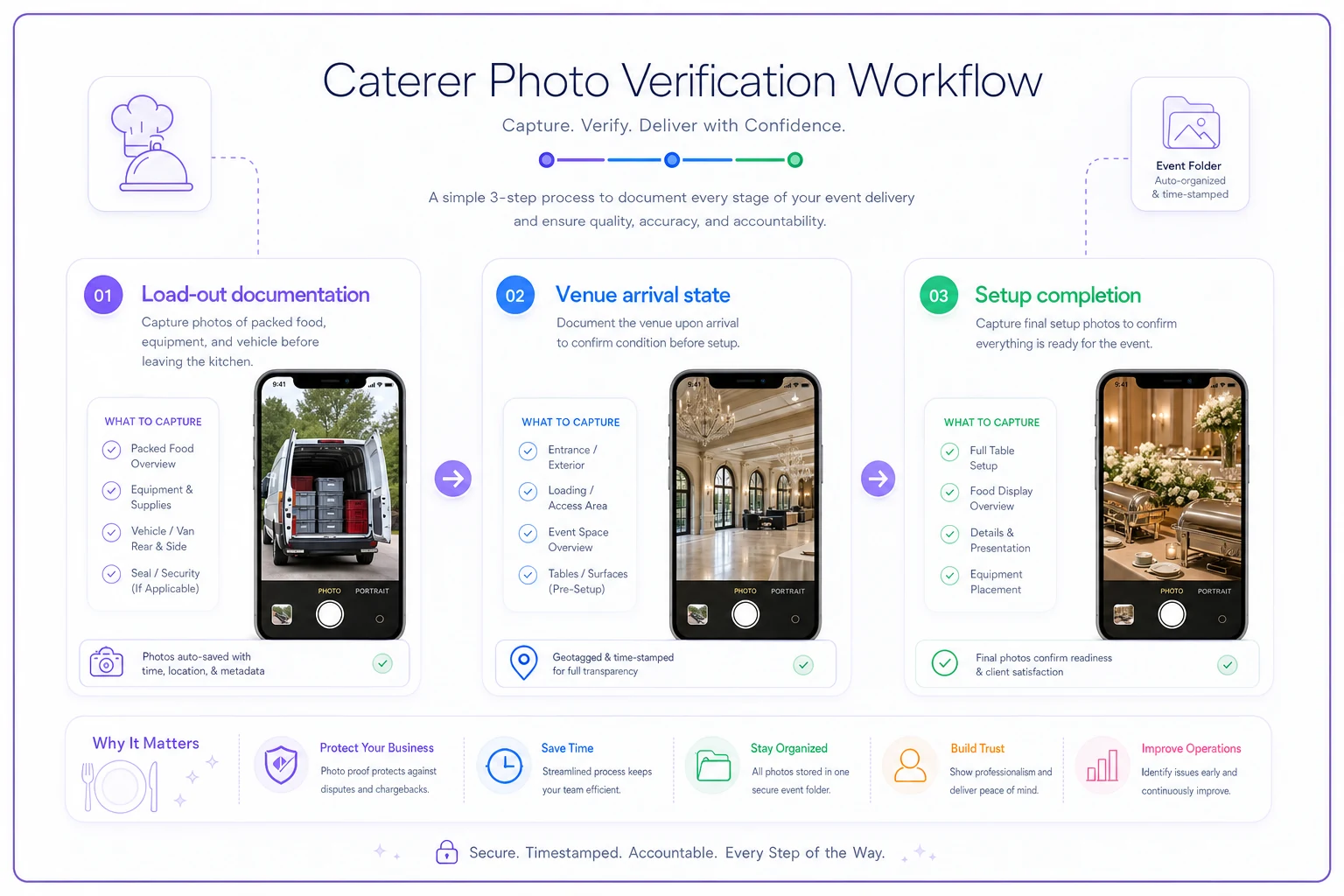
The workflow breaks into three photo checkpoints:
Load-out documentation: Quick photos of each van section after packing. Hot boxes in place, glassware secured, décor items protected. These images take seconds but provide evidence if items get damaged in transit or go missing at venue.
Venue arrival state: Before unloading, photograph how the venue looks. Empty tables, existing equipment, any pre-existing damage. This protects you from blame for venue issues that existed before you arrived.
Setup completion: Final photos of buffet lines, place settings, bar arrangements. These become your proof of proper setup when clients claim something was wrong. They also create a reference library for training new staff on your presentation standards.
Store these images in event folders, not random phone galleries. Each event gets its own digital folder: pre-load, arrival, completion. When a client questions whether you brought enough dessert plates, you have timestamped proof. When venue managers claim you damaged their floor, you have arrival photos showing existing scratches.
| Photo Checkpoint | What to Photograph |
|---|---|
| Load-out documentation | Each van section after packing (hot boxes, glassware, décor protection) |
| Venue arrival state | Empty tables, existing equipment, pre-existing damage |
| Setup completion | Final buffet lines, place settings, bar arrangements |
Visual workflow of photo checkpoints:
Each event gets its own digital folder: pre-load, arrival, completion. When a client questions whether you brought enough dessert plates, you have timestamped proof. When venue managers claim you damaged their floor, you have arrival photos showing existing scratches.
Integration Into Event Records
Photo verification only works when it becomes part of your permanent event record. These images aren't just CYA documentation — they're operational intelligence for future events.
Tag photos with relevant details:
-
Event type and size
-
Specific equipment quantities
-
Setup configuration used
-
Any special requirements met
-
Problems encountered and solutions
This creates a searchable library of successful setups. Planning another 150-person corporate gala? Pull up photos from similar past events. See exactly how much space the buffet required, how many coffee stations you set up, what the dessert display looked like.
New staff can review photos from similar events before their first solo setup. Instead of vague instructions about "professional presentation," they see exactly what your standards look like in practice.
Making It Stick Without The Friction
The best checklist system fails if your team won't use it. Adoption happens through reducing friction, not adding steps.
Print role-specific lists on different colored paper. Blue for kitchen, green for bar, yellow for décor. Visual distinction prevents mix-ups and speeds identification. Laminate frequently-used templates so teams can check off with dry erase markers instead of printing new copies.
Mount checklist holders in your packing areas. Lists stay visible, accessible, and in the workflow path. Your hot food lead grabs their blue checklist from the holder next to the hot boxes. No searching, no printing, no delays.
Build verification into natural pause points. While the van warms up, run the cross-check. While waiting for the venue to open, take arrival photos. These aren't extra steps — they're productive use of existing downtime.
Digital tools help but aren't mandatory. A simple shared spreadsheet where teams check off items from their phones works fine. The key is matching your system to your team's actual behavior, not forcing new habits that won't stick.
Print role-specific lists on different colored paper.
The key is matching your system to your team's actual behavior, not forcing new habits that won't stick.
Real Caterer Example: 85% Reduction in Missing Items
A Dallas catering company running roughly 35 events monthly was averaging 8-10 missing item incidents per month. Not disasters, but enough small failures to stress operations and irritate clients.
They implemented modular checklists broken into five templates: corporate, wedding, social, outdoor, and cocktail. Each template got role-based sections for their four-person core team. Simple laminated sheets, color-coded by role.
-
corporate
-
wedding
-
social
-
outdoor
-
cocktail
The photo verification started small — just load-out and setup completion shots on the operations manager's phone. No fancy system, just consistent documentation in labeled folders.
After three months, missing item incidents dropped to 1-2 per month. The remaining issues were mostly unusual client requests that fell outside standard templates. Time spent on emergency supply runs dropped from around 12 hours monthly to under 2 hours.
The bigger impact was on client complaints. Previous months averaged 3-4 equipment-related complaints. After implementation, they went two months straight without a single equipment complaint. When one finally came in — claiming insufficient serving utensils — they had photos proving correct quantities were provided.
When Modular Checklists Become Essential
Small operations with consistent event types might survive with basic lists. Once you hit certain complexity triggers, modular systems become non-negotiable:
Running multiple simultaneous events requires clear separation between setups. Mixing items between vans becomes a constant risk without event-specific checklists.
Offering diverse event types means wildly different equipment needs. A sushi station requires completely different items than a taco bar. Generic lists can't handle this range without becoming bloated.
Growing your team beyond 5-6 people creates coordination challenges. Role-based accountability becomes essential when you can't personally oversee every pack-out.
High-stakes events like weddings or executive galas can't tolerate missing items. The reputation damage from forgotten wedding elements far exceeds the effort of maintaining proper checklists.
The Technology Question
AI-powered operational software can transform manual checklists into dynamic systems. Instead of printed sheets, your team checks items on tablets. The system automatically adjusts lists based on event type, flags missing items before departure, and stores photo verification with timestamps.
Automated systems can pull equipment lists directly from event orders. Book a 150-person wedding with champagne toast? The system adds champagne flutes to the beverage specialist's checklist automatically. No manual list building, no forgotten items.
The real advantage comes from pattern recognition. Software tracking your operations spots trends — certain items frequently forgotten, specific team members missing checks, particular event types causing problems. These insights let you adjust processes before problems become patterns.
But paper systems work fine for many caterers. The key is consistency and accountability, not technology. Better to have laminated checklists your team actually uses than digital systems they ignore.
Sustaining the System Long-Term
Modular checklists require maintenance to stay relevant. Your equipment changes, event types evolve, new items enter rotation. Schedule quarterly reviews where team members suggest updates to their role-specific sections.
Track which items actually cause problems. If serving ladles never get forgotten, maybe they don't need prominent placement on the list. If cocktail napkins consistently go missing, add redundant checks across multiple roles.
Create a feedback loop from events to checklists. When something goes wrong, update the relevant template immediately. Client requested special dietary labels you forgot to pack? Add them to the corporate template that day.
Rotate cross-check responsibilities so multiple people learn the verification process. This prevents single points of failure and keeps the final review fresh. Different eyes catch different problems.
Celebrate the wins when possible. When your team runs a month without missing items, acknowledge it. When photo documentation prevents a client complaint, share the story. Success reinforces system adoption better than any mandate.
Moving Beyond Reactive Mode
Forgetting equipment is a solvable problem. Not through better memory or more careful staff, but through systems that match your operational reality.
Modular checklists eliminate the noise of irrelevant items. Role-based sections create clear accountability. Photo verification provides proof when questions arise. Together, they transform pack-and-load from a stress point into a predictable process.
The shift from generic to modular isn't just about fewer missing items. It's about professional operations that clients trust. When everything arrives, everything works, and you have documentation to prove it, your reputation for reliability becomes your competitive advantage.
Start with one event type. Build its modular checklist. Test the role divisions. Add photo verification for just that template. Once it works smoothly, expand to other event types. Better to have one perfect checklist than five mediocre ones.
Your team wants to succeed. Give them tools that make success inevitable, not dependent on perfect memory under pressure. That's what modular pack-and-load systems deliver — reliability through process, not prayer.
Ready to elevate your catering business?
Join 500+ caterers trusting Caterngly to save time, reduce errors, and deliver flawless events.