


Your lead captain just texted. Again. The 300-person wedding at the country club needs four more servers—right now. Meanwhile, your downtown venue is already short-staffed for the corporate gala, and the backyard wedding across town just lost two servers who got their schedules mixed up.
By midnight, you're looking at overtime bills that'll eat half your profit from all three events combined. This isn't a one-time crisis. It's every Saturday from May through October.
The brutal math of overlapping events hits different when you're running them. A typical Saturday with three overlapping events can generate $18,000 in revenue. Sounds great until unplanned overtime turns that into $13,200 after you factor in time-and-a-half for 12 people working past their scheduled hours. That's nearly 27% of gross revenue gone to labor alone—before you even count food costs.
The shift-split matrix that actually prevents Saturday night meltdowns
Most catering operations try to schedule staff like they're running a restaurant. One team, one schedule, hope for the best. But overlapping events need a completely different approach.
Start with event density mapping. Pull your calendar for the next 90 days and mark every booking by time blocks:
-
Morning setup (6am-11am)
-
Afternoon transition (11am-3pm)
-
Evening service (3pm-11pm)
-
Late breakdown (11pm-2am)
Now the part that matters: overlap zones. When the country club wedding runs 4pm-11pm and downtown gala runs 6pm-midnight, you have a five-hour overlap zone from 6pm-11pm. That's where staffing falls apart.
Build your scheduling matrix around these overlap zones, not individual events. For a typical three-event Saturday:
| Time Block | Event A (Country Club) | Event B (Downtown) | Event C (Backyard) | Total Staff Needed |
|---|---|---|---|---|
| 2pm-4pm | 4 (setup) | 2 (early setup) | 0 | 6 |
| 4pm-6pm | 8 (final prep) | 4 (setup) | 3 (setup) | 15 |
| 6pm-8pm | 12 (service) | 10 (service) | 6 (service) | 28 |
| 8pm-10pm | 12 (service) | 10 (service) | 4 (wind down) | 26 |
| 10pm-midnight | 4 (breakdown) | 8 (service) | 2 (cleanup) | 14 |
Notice how staff requirements spike during overlap zones? That 6pm-8pm window needs 28 people. If you only have 22 full-timers, you're already looking at overtime or scrambling for last-minute help.
Float staff allocation: the buffer zone nobody talks about
Here's what separates profitable catering operations from those bleeding money on labor: dedicated float staff pools.
End chaos with centralized catering management.
Caterngly helps you plan, confirm, and manage every catering event seamlessly.
- Unified event and order management
- Real-time client updates
- Staff and resource scheduling
No credit card required
Float staff aren't your regular team members assigned to specific events. They're scheduled specifically for overlap coverage. Think of them as your operational insurance policy.
For every three overlapping events, allocate 20% float coverage. So if those three events need 28 total staff at peak, schedule 6 floaters. Yes, this means scheduling 34 people when you technically need 28. The math seems wrong until you factor in reality.
Schedule float staff in geographic clusters to minimize drive time between venues.
Last-minute client additions happen. The country club decides they want passed appetizers during cocktail hour—that's two more servers. Downtown gala extends their bar service by an hour. Backyard wedding has a guest count jump from 75 to 95.
Without float staff, these changes trigger overtime cascades. Your captain at the country club pulls servers from downtown. Downtown then needs coverage, so they grab from the backyard event. Now all three events are scrambling, quality drops, and everyone ends up working past their scheduled time.
Float staff absorb these variations without triggering overtime. They cost you regular wages for planned hours instead of time-and-a-half for panic coverage.
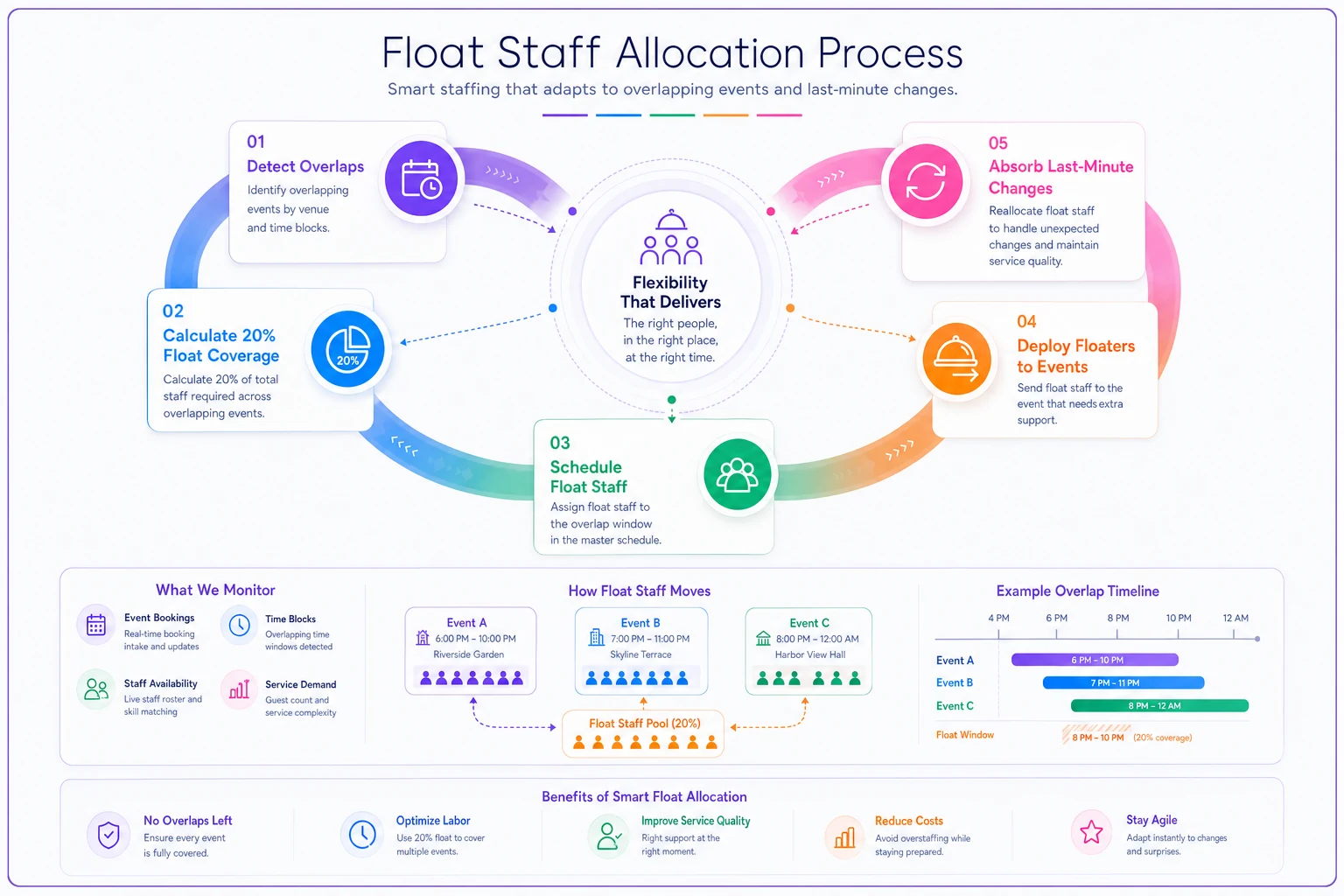
This illustrates how float staff are scheduled and deployed during overlap windows.
Advance notice buffers that prevent Wednesday panic scheduling
The typical catering scheduling cycle: finalize schedules Thursday for the following weekend. By Wednesday, the group texts start flying. "Can anyone cover Saturday?" "Need two more for downtown!" "Who's available for overtime?"
Build your advance notice buffer into the scheduling matrix. Every event gets locked 10 days out, not 3. This seems impossible when clients keep changing things, but that's exactly why you need the buffer.
At 10 days out, you schedule to 110% of expected need. Client says 200 guests? Schedule for 220. They want four hours of service? Plan for five. This isn't padding for profit—it's preventing overtime bleeding.
When changes inevitably come at the 3-day mark, you're adjusting down from your buffer, not scrambling up from minimum coverage. The psychological difference alone changes how your team operates. Instead of stress texts about finding coverage, you're sending "Hey, event got smaller, anyone want Saturday night off?"
The 10-day lock also forces client communication patterns to change. When they know final counts affect scheduling that far out, they get you real numbers earlier. Not perfect numbers, but workable ones.
Real cost comparison: overtime chaos versus planned float scheduling
Actual numbers from a typical June Saturday with three overlapping events:
Scenario A: Traditional reactive scheduling
-
Base staff scheduled
22 people at $18/hour
-
Service hours
6 hours average
-
Base labor cost
$2,376
-
Overtime triggered
8 people working 3 extra hours each
-
Overtime cost
$648 (8 × 3 × $27)
-
Last-minute call-ins
4 people at $25/hour × 6 hours = $600
-
Total labor cost
$3,624
-
Labor as percentage of $18,000 revenue
20.1%
Scenario B: Matrix-based float scheduling
-
Base staff scheduled
22 people at $18/hour
-
Float staff scheduled
6 people at $18/hour
-
Service hours
6 hours planned
-
Base labor cost
$2,376
-
Float labor cost
$648
-
No overtime triggered
-
No emergency call-ins needed
-
Total labor cost
$3,024
-
Labor as percentage of $18,000 revenue
16.8%
That's $600 saved on a single Saturday. Across a 20-week peak season, you're looking at $12,000 in prevented overtime costs. More importantly, your team isn't burnt out by July, and service quality stays consistent because nobody's running on fumes.
When float scheduling backfires (and why that's okay)
Some Saturdays, you'll have six float staff standing around doing prep work because all three events run smooth. This feels like waste. Your kitchen manager will definitely mention it. "We're paying people to fold napkins?"
This is short-term thinking. Those "wasted" float hours cost you $648. One overtime spiral costs you $1,200 or more. You need less than 50% utilization of float staff to break even. In practice, float staff hit 75-80% utilization during peak season because something always comes up.
The backfire scenario actually helps in unexpected ways. Float staff doing prep work means your core team stays focused on service. They're rolling silverware, portioning desserts, or helping with breakdown at the first completed event. This isn't waste—it's capacity management.
Float staff become your training ground. New hires work float shifts before getting assigned to specific events. They learn your systems, work with different captains, see various venue types. By the time they move to regular scheduling, they're fully operational.
Building the Monday morning review loop
Every Monday, pull your actual versus planned staffing from the weekend. Don't just look at total hours. Break it down:
-
Where did float staff actually deploy?
-
Which events triggered overtime despite planning?
-
What client changes came in after the 10-day lock?
-
Which captains consistently run lean versus those who always need backup?
This data shapes next weekend's matrix. If downtown venues consistently need 15% more staff than planned, adjust your baseline. If afternoon backyard weddings always wrap early, reduce that allocation.
The review loop also catches scheduling patterns you'd miss otherwise. Maybe your Saturday night events always overlap but Sunday brunches never do. That means Saturday needs maximum float coverage while Sunday can run leaner.
Track these patterns in something more sophisticated than spreadsheets. When you're managing overlapping events every weekend, manual scheduling becomes its own time sink. AI-powered operational software starts making sense here—not as magic, but as a tool that learns your patterns and suggests optimal float allocations based on historical data.
The Friday night pre-brief that changes everything
Friday night, 6pm. Every captain, every float team member, on a 15-minute video call. Not to review individual events—they know their assignments. This call covers overlap zones and float deployment triggers.
"If country club needs help between 6 and 8, pull from float pool first, not downtown."
"Downtown bar service might extend. Float team B, stay ready for 10pm deployment."
"Backyard wedding has a nervous bride. If they need anything, respond fast."
This pre-brief creates shared situational awareness. Float staff know where they'll likely deploy. Captains know their backup options. Everyone understands the priority order if multiple events need help simultaneously.
The pre-brief also surfaces last-minute intel. The country club captain mentions the client added a champagne toast. Downtown notes their venue's elevator is broken. Backyard wedding moved their ceremony inside due to weather. These details determine where float staff pre-position themselves Saturday afternoon.
Escape routes for the three-event pile-up
Even with perfect planning, some Saturdays explode. The country club adds 50 guests day-of. Downtown's catering van breaks down. Backyard wedding's timeline shifts two hours later.
Build escape routes into your matrix. These are pre-planned staff movements that minimize damage when everything goes sideways.
Escape Route A: Service quality preservation
-
Pull float staff to highest-revenue event first
-
Reduce service levels at lowest-margin event
-
Authorize overtime only for captains, not entire teams
Escape Route B: Geographic consolidation
-
Combine pickup/breakdown crews between nearby venues
-
Share bartenders between events with staggered bar times
-
Deploy float staff to minimize drive time between venues
Escape Route C: Timeline manipulation
-
Negotiate earlier breakdown at completed events
-
Delay non-critical setup at later events
-
Compress transition periods to free up overlap staff
Each escape route has a trigger condition. Don't wait for full meltdown to activate them. If you're pulling more than three float staff to a single event, trigger Escape Route A. If two events within 5 miles both need help, trigger Route B.
Why traditional scheduling software misses the overlap problem
Most scheduling tools treat each event as an island. They can tell you who's working the Johnson wedding, but not how the Johnson wedding impacts the Smith corporate gala happening three miles away at the same time.
The overlap problem needs different logic. You're not just matching people to events. You're optimizing across multiple simultaneous events with shared resources and competing priorities.
This gets complex when you factor in:
-
Travel time between venues
-
Skill requirements (not every server can bartend)
-
Client relationships (some clients insist on specific captains)
-
Equipment constraints (only one refrigerated truck)
-
Venue-specific knowledge (downtown's loading dock needs special access codes)
Manual scheduling hits a wall around 15-20 events per month. Beyond that, you're spending more time juggling schedules than running operations. AI-powered platforms help here—they can process these overlapping constraints and suggest optimal configurations you'd never spot manually.
The key isn't replacing human judgment. It's augmenting it. AI handles the mathematical optimization of who goes where when. You handle the relationship aspects, quality standards, and emergency decisions that require context machines don't understand.
The Saturday night text that tells you it's working
You know the scheduling matrix works when Saturday night texts change. Instead of "HELP! Need two servers NOW!" you get "Float team deployed to country club, smooth transition."
Instead of Sunday morning overtime approval requests, you see float utilization reports. "Float Team A: 5 of 6 hours utilized. Float Team B: 4 of 6 hours utilized. No overtime triggered."
The real victory isn't just labor cost savings. It's that your core team shows up Monday ready to work, not exhausted from emergency coverage. Your captains focus on service quality instead of staffing panic. Your clients get consistent execution even when three events collide.
A catering company running 12-15 overlapping events monthly can save between $35,000 and $50,000 annually in prevented overtime. But the bigger impact is operational. When staffing stops being a crisis, you can scale. Take that fourth Saturday booking. Run simultaneous brunches and dinners. Say yes to the last-minute corporate lunch because you know your float pool can handle it.
The shift-split matrix isn't about perfect scheduling—that doesn't exist in catering. It's about building systematic buffers that absorb the chaos without triggering overtime spirals. Once you see Saturday nights as interconnected puzzles instead of individual events, the solution becomes clear: plan for overlap, staff for reality, and keep float coverage ready for when (not if) things change.
Your next three-event Saturday is coming. The question isn't whether complications will happen—they will. The question is whether you'll handle them with expensive overtime or planned float coverage. The matrix makes that choice before Saturday night arrives, which means you can focus on what really matters: delivering exceptional events without destroying your margins in the process.
Ready to elevate your catering business?
Join 500+ caterers trusting Caterngly to save time, reduce errors, and deliver flawless events.