


You quoted $12,000 for a 150-person corporate gala. Clean proposal, deposit paid, menu locked. Then three weeks out, the client calls: "We're thinking about upgrading to the filet mignon for VIPs at their table. Also, can we add a champagne tower? And maybe extend service by an hour?"
You scramble to recalculate costs. The filet upgrade alone adds $450 in food costs. The champagne tower needs special glassware rental ($180), extra champagne ($320), and a dedicated server for safety ($150). The extended hour means overtime for six staff members ($540). Your original 22% margin just dropped to 11%.
But what really stings—you approved these changes over email, quoted a rough number verbally, and now the client remembers a different price than what you calculated. The invoice dispute eats another three hours of back-and-forth.
This pattern destroys catering profits. Not the big obvious disasters, but the steady erosion from unmanaged change requests that seem harmless individually but compound into margin killers.
Most caterers I know lose at least 3-5% of their total margin this way every month.
Why catering businesses struggle with change management
Most caterers handle change requests through scattered emails, texts, and verbal agreements. The workflow typically looks chaotic: client texts about adding appetizers, you calculate costs on scratch paper, quote over the phone, then try remembering all changes when updating the final invoice.
The problems multiply fast. Your team starts prep based on outdated information because the change never made it from your phone to the kitchen prep list. The client disputes charges because they don't remember approving the upcharge for imported cheese. Your event captain shows up with staffing for 150 when the headcount increased to 180 last week.
Traditional catering software doesn't solve this either. Most platforms treat changes as simple invoice adjustments, missing the operational complexity entirely. They don't track approval chains, enforce pricing rules, or update dependent workflows. You're left managing changes manually while juggling everything else.
The worst part happens post-event. You discover the client never formally approved that $800 bar extension. They assumed it was included. Now you're eating the cost or damaging a relationship.
Building a change-order system that actually protects margins
A functional catering change order workflow needs three core components working together: standardized forms that capture all details, automated pricing rules that prevent margin erosion, and approval workflows that create clear documentation.
End chaos with centralized catering management.
Caterngly helps you plan, confirm, and manage every catering event seamlessly.
- Unified event and order management
- Real-time client updates
- Staff and resource scheduling
No credit card required
Start with the change request form itself. Skip generic templates. Your form needs fields specific to catering operations.
Essential form fields:
-
Original contract reference number
-
Change category (menu, headcount, timing, service, equipment)
-
Current specification vs requested change
-
Deadline for decision
-
Impact on other services
-
Required lead time for implementation
The magic happens when you build pricing rules directly into the workflow. Instead of calculating every change manually, establish formulas that protect your margins automatically.
For headcount increases within 14 days of the event, apply a 15% rush surcharge. Menu upgrades trigger preset upcharge amounts based on the difference in food costs plus your target margin. Service extensions automatically calculate overtime rates for the required staff count.
Here's what this looks like in practice:
| Change Type | Timing | Base Cost Impact | Margin Protection | Total Upcharge |
|---|---|---|---|---|
| Headcount +10% | 14+ days out | $12 per person | Standard 25% | $15 per person |
| Headcount +10% | 7-13 days | $12 per person | 25% + 10% rush | $16.50 per person |
| Menu upgrade (chicken to beef) | Any time | +$8 per plate | Standard 25% | $10 per plate |
| Service extension | Any time | $90/hour labor | 40% margin | $126/hour |
| Equipment addition | 7+ days | Rental + delivery | 30% margin | Rental × 1.3 |
The approval workflow prevents the nightmare scenario where changes happen without documentation. Every change request generates a formal change order with clear pricing. The client must approve digitally before any work begins. No more "I thought that was included" disputes.
Converting change chaos into predictable processes
When change orders integrate with your broader operational workflows, that's where things get interesting. A headcount increase doesn't just update the invoice—it triggers cascade updates across your entire operation.
When a client approves adding 20 guests, your system automatically adjusts the purchase order quantities, updates the prep schedule, alerts the staffing coordinator about additional servers needed, and recalculates vehicle requirements for transportation. This integration prevents the common disaster where sales knows about changes but operations doesn't.
Consider this scenario: A wedding client wants to add a late-night snack station, submitted five days before the event.
Without a proper workflow, this creates chaos. Someone might forget to order the extra chafing dishes. The kitchen doesn't know to prep additional food. Nobody schedules the extra server to manage the station. You're improvising on event day.
With an integrated change-order workflow, the approved change automatically:
-
Adds items to the equipment pull list
-
Updates the prep schedule with quantities and timing
-
Triggers a staffing adjustment notification
-
Calculates the true total cost including labor and equipment
-
Updates the final invoice
-
Creates a paper trail for client approval
The difference between scrambling and smooth execution comes down to having changes flow through a defined process rather than relying on manual communication and memory.
Below is a visual of how an approved change cascades through operations.
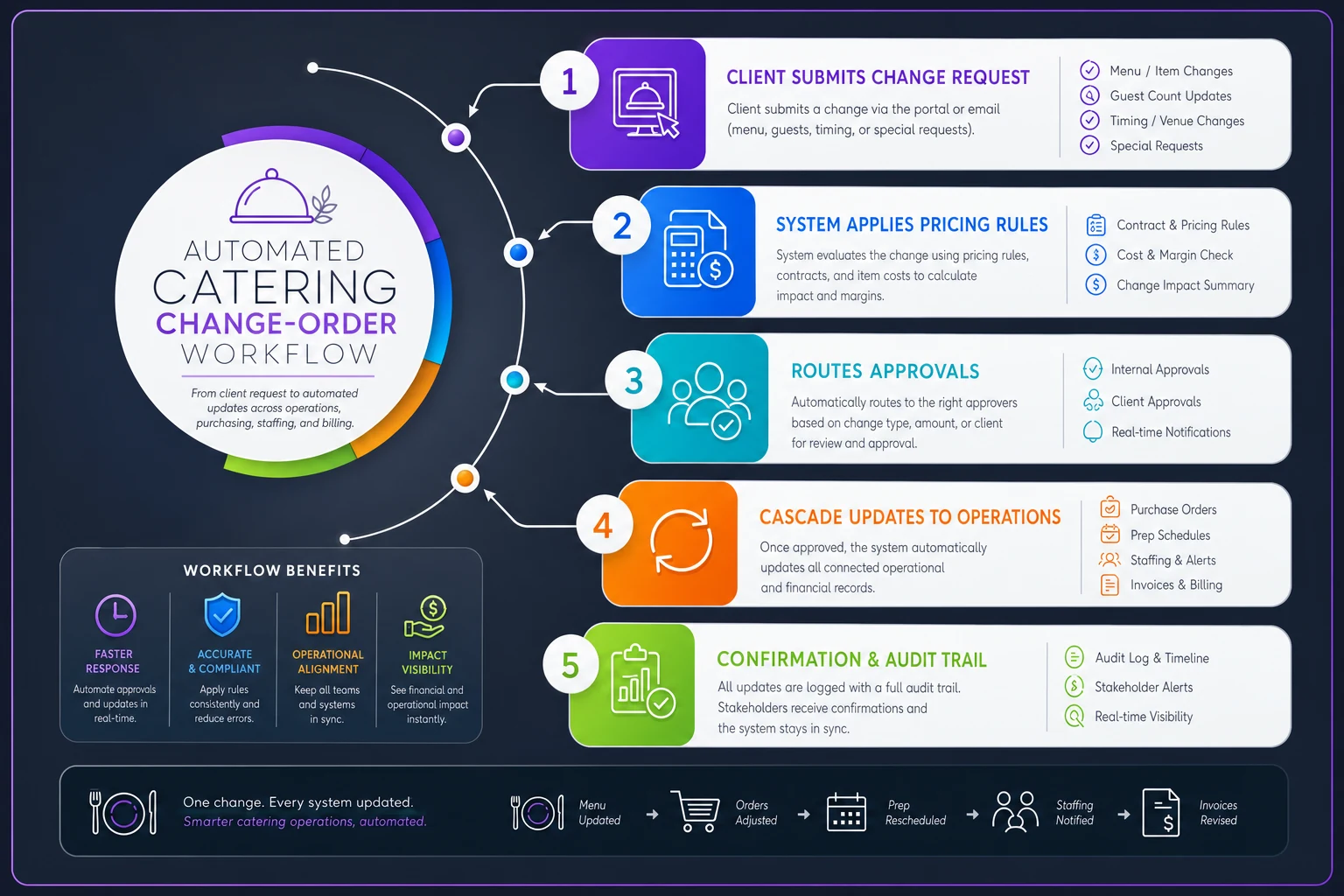
This integration prevents the common disaster where sales knows about changes but operations doesn't.
When to say no: protecting profitability through change limits
Not every change request deserves a yes. The most profitable catering operations understand that some changes threaten the entire event's success or profitability, and they have clear criteria for declining requests.
Establish non-negotiable cutoff periods. Menu changes might close 10 days out. Headcount increases beyond 15% might require 14 days notice. Service style changes (buffet to plated) might be impossible within 21 days. These aren't arbitrary rules—they reflect operational reality.
Some changes should trigger automatic "no" responses:
-
Requests that would push food costs above 40% of revenue
-
Changes requiring equipment your venue cannot accommodate
-
Alterations that would violate health permits or venue restrictions
-
Modifications that would require more staff than you can reliably source
Communicate these boundaries upfront, not during crisis mode. Include a change limitation clause in your original contract. Specify cutoff dates, maximum percentage changes, and categories of impossible modifications.
When you need to decline a change, offer alternatives. Can't switch from buffet to plated service five days out? Offer stationed service as a middle ground. Can't add 50 guests to a 100-person event tomorrow? Suggest a separate cocktail reception space for additional guests.
Real pricing formulas that prevent margin erosion
Generic percentage markups don't work for change orders. The labor and complexity of implementing changes mid-stream requires different pricing logic than your initial quote.
Late-stage menu changes need to account for wasted prep. If you've already ordered chicken for 150 guests and they want to switch to salmon, you're eating the cost of that chicken plus paying premium prices for rush seafood orders. The formula becomes: (Sunk cost of original item) + (Rush cost of new item × 1.4) + (25% margin on total).
Headcount increases create exponential complexity. Adding 10 guests to a 50-person event is straightforward. Adding 10 guests to a 200-person event might push you into needing an additional chef, another van, or a larger prep space. Your pricing must reflect these threshold breaks.
Build an escalating surcharge schedule based on timing:
-
21+ days before event
Standard pricing
-
14-20 days
10% surcharge
-
7-13 days
20% surcharge
-
3-6 days
35% surcharge
-
48 hours or less
50% surcharge or decline
Service extension requests need special attention. The last hour of service costs more than the first hour. Staff are tired, you might hit overtime, and breakdown gets pushed later. Price extensions at 1.5× your standard hourly rate for the first additional hour, 2× for anything beyond that.
Equipment and venue complications hiding in change requests
A request to add a chocolate fountain seems simple until you realize the venue only has one suitable electrical circuit in the dessert area, and you're already using it for the coffee station. Now you need extension cords (safety hazard), a different table layout (requires venue approval), or a generator (massive cost increase).
Every equipment addition needs a compatibility check:
-
Power requirements vs venue capacity
-
Space requirements vs floor plan
-
Weight limits for venue flooring
-
Transportation capacity in your vehicles
-
Setup time impact on your schedule
Here's a breakdown that flags complications automatically:
| Equipment Add | Power Needs | Space Needs | Transport Impact | Setup Time | Special Requirements |
|---|---|---|---|---|---|
| Chocolate Fountain | Dedicated 20A circuit | 6×6 ft station | Fragile transport box | 45 minutes | Level surface, away from AC vents |
| Champagne Tower | None | 4×4 ft clear area | Special glass crates | 30 minutes | Absolutely level surface |
| Carving Station | Heat lamps circuit | 8×6 ft + queue space | Hot box transport | 20 minutes | Ventilation, away from sprinklers |
| LED Dance Floor | Multiple circuits | Exact dimensions | Truck required | 2-3 hours | Perfectly flat surface |
When equipment changes trigger venue complications, your change order should include a venue coordination fee. You're spending time confirming feasibility, adjusting floor plans, and potentially meeting with venue coordinators.
The approval chain that eliminates payment disputes
Verbal approvals are worthless when invoicing disputes arise. Your change-order workflow needs an unbreakable approval chain that creates indisputable documentation.
Every change order should generate a formal document showing:
-
Original contract terms (reference number, date, original value)
-
Specific changes requested (detailed description, not summary)
-
Cost breakdown (base cost, surcharges, taxes)
-
Impact on event timeline
-
Expiration date for approval
-
Digital signature requirement
Documentation alone doesn't prevent disputes. The approval process itself needs structure. For changes under $500, the primary contact can approve. For changes between $500-2000, require approval from whoever signed the original contract. For changes over $2000, require written approval from an authorized financial decision maker.
Build automatic reminders into your workflow. If a change order hasn't been approved within 48 hours, it expires and must be resubmitted. This prevents clients from sitting on decisions until the last minute when rush charges apply.
For corporate clients, understand their internal approval process. A marketing manager might have authority for events under $10,000 but need VP approval for anything higher. Get this information during initial contracting and build appropriate approval routing.
Integrating changes into live operations without chaos
The hardest part about change orders isn't pricing or approval—it's ensuring the approved changes actually happen correctly on event day. Too many changes get approved in the office but lost in execution.
Your change workflow must push updates to every affected system and person. When that chocolate fountain gets approved, the change should:
-
Update the equipment pull list for warehouse staff
-
Add setup tasks to the event timeline
-
Adjust the floor plan documentation
-
Alert the truck loading team about fragile items
-
Update the captain's event packet
-
Modify the breakdown checklist
This integration prevents the Saturday morning panic when someone realizes nobody brought the chocolate for the fountain that was added Wednesday.
Build change visibility into your prep workflow. Kitchen staff should see a clear indicator when working from a modified menu. Red highlighting on prep lists shows changed quantities. A "changes since last version" summary prevents working from outdated information.
For complex events with multiple changes, create a change log that travels with the event. Every team member can see what changed and when, preventing confusion when the client mentions something on-site that only sales knows about.
Turning systematic change management into competitive advantage
Most catering companies treat change orders as a necessary evil. When you build a systematic workflow, changes become a profit center rather than a profit leak.
Clients value flexibility. When you can confidently say "Yes, we can make that change, here's exactly what it costs and when we need approval," you're providing certainty in an uncertain process. That confidence comes from knowing your workflow protects margins automatically.
Track your change-order patterns. You'll discover that certain client types consistently request similar changes. Corporate clients often add breakfast to day-two of conferences. Wedding clients frequently increase bar service hours. Build these patterns into your initial proposals as optional add-ons with pre-negotiated pricing.
Well-managed change orders also reduce stress across your team. Sales doesn't worry about profitability when quoting changes. Operations trusts that approved changes include adequate resources. Finance knows every change has proper documentation.
The compound effect is powerful. If you're running 20 events per month and average 2-3 changes per event, that's 40-60 change orders monthly. If poor change management costs you 2% margin per change, you're leaving serious money on the table. A proper workflow might add 1-2% margin instead, creating a 3-4% swing on your total revenue.
Clients remember the caterer who handled their last-minute CEO's dietary restriction smoothly. They forget the caterer who seemed frazzled by every change request. Systematic change management turns potential friction points into demonstrations of professionalism.
Building your change-order workflow
Start simple. Don't try to build the perfect system immediately. Begin with a basic change-order form and approval process. Add pricing rules for your most common changes. Integrate with operations gradually.
Pick your biggest pain point first. Maybe it's last-minute headcount changes that wreck food quantities. Build specific workflows for that scenario. Once it's working smoothly, expand to menu modifications. Then tackle service extensions.
The technology side doesn't need to be complex. AI-powered operational software can automate much of this workflow—from calculating pricing based on your rules to routing approvals to updating operational documents. The system learns your patterns over time, suggesting pricing for unusual requests based on similar past changes.
Start by automating the single most frequent change type you see so the team builds trust in the process quickly.
Even a spreadsheet-based system beats nothing. The key is having a consistent process that everyone follows. No more verbal approvals. No more calculating changes on napkins. No more hoping operations got the message about modifications.
Your change-order workflow becomes a living system that evolves with your business. Track which changes cause the most friction. Notice which clients need extra guidance through the process. Identify which team members need additional training on handling modifications.
The goal isn't to eliminate changes—clients will always have evolving needs. The goal is to handle changes profitably and professionally, turning a common source of chaos into a demonstration of operational excellence. When changes flow through a defined workflow with clear pricing and documentation, they stop being problems and start being opportunities for additional revenue and client satisfaction.
Ready to elevate your catering business?
Join 500+ caterers trusting Caterngly to save time, reduce errors, and deliver flawless events.