


Most catering software comparisons online are useless because they list forty tools with no real opinion. You don't need forty. You need four things to actually work together without manual re-entry: a booking calendar that doesn't double-book your Saturday crew, a client portal that stops the endless email threads, per-event costing you can trust before you sign a contract, and staff scheduling that reflects who's actually available.
This guide shortlists six US-focused platforms that cover those four pillars reasonably well for small and mid-sized caterers. I'll give you pricing shapes, the integrations that matter, and who each one actually fits. No vendor paid for placement here, and I'll tell you flatly where each one falls short.
There is no perfect tool. Every one of these forces a trade-off somewhere. The goal is to pick the trade-off you can live with at your event volume.
How to read this guide before you look at any vendor
A mistake that costs caterers months: they pick based on the demo instead of their event profile. A platform built for high-volume drop-off catering will frustrate a full-service wedding caterer, and vice versa.
-
Monthly event count — 8 events looks nothing like 80 in software terms.
-
Average event complexity — plated dinners with rentals and staffing vs. corporate boxed lunches.
-
Team size touching the system — just you and a coordinator, or ten people including site leads?
Pricing in this space comes in three shapes, and the shape matters more than the sticker price:
-
Per-user monthly — cheap at low headcount, punishing as you add office staff.
-
Flat tier (feature-gated) — predictable, but you often buy a tier for one feature you need.
-
Per-event or usage-based — great when volume is seasonal, dangerous during peak months.
One honest warning before anything else: menu costing accuracy depends entirely on your ingredient and labor data being current. No tool fixes stale cost cards. If your food costs have been drifting with inflation, sort that out first — the USDA food-price outlook breakdown on menu rotation and procurement is a better starting point than any software demo, because a per-event costing module just multiplies whatever numbers you feed it.
A simple workflow to match your event profile to vendor features:
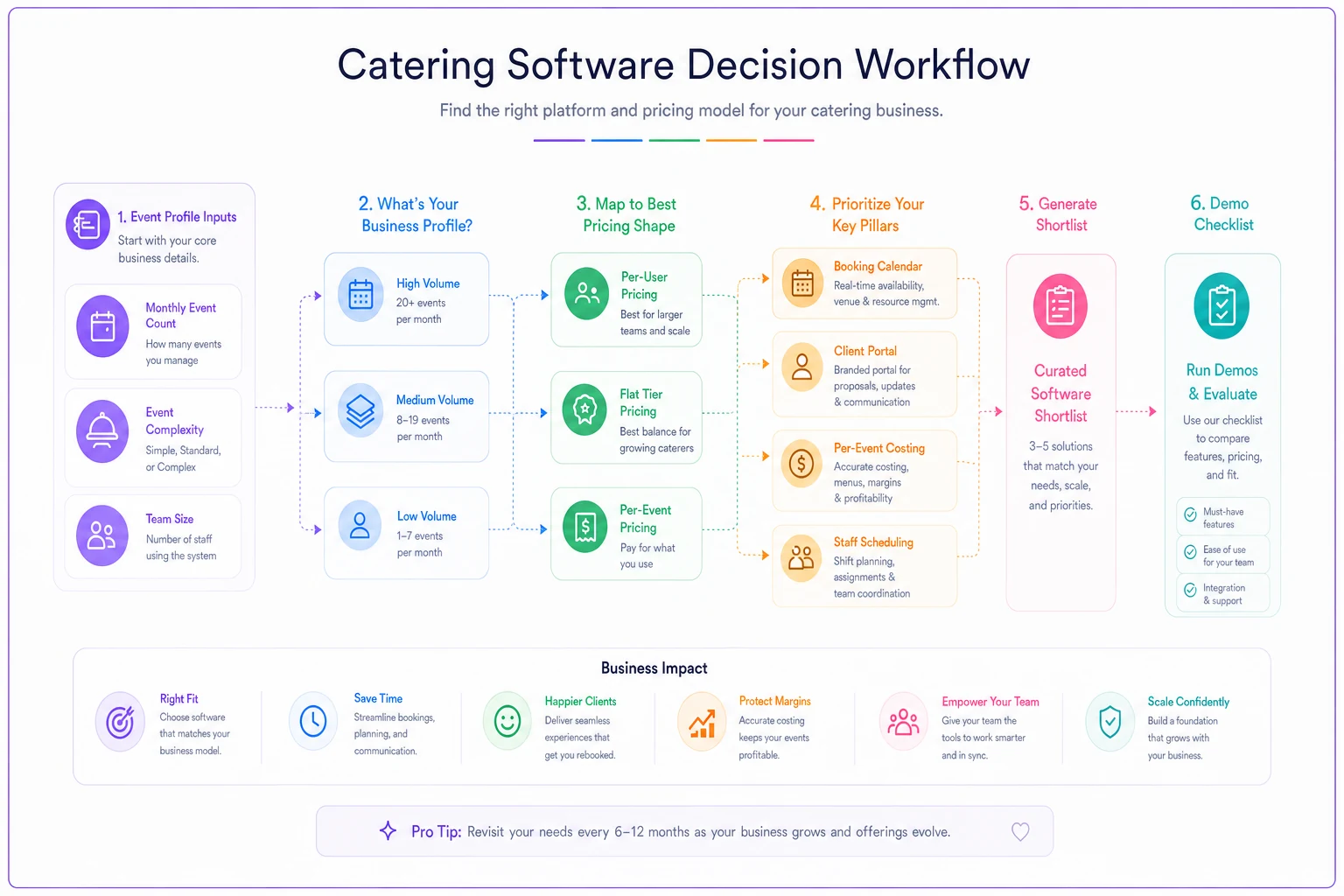
Use this flow as a quick visual when you triage vendors before demos.
The six platforms at a glance
The table below gives you a quick read across all six platforms before you dig into each one. Use it to filter out anything that obviously doesn't fit your model before you waste time on demos.
End chaos with centralized catering management.
Caterngly helps you plan, confirm, and manage every catering event seamlessly.
- Unified event and order management
- Real-time client updates
- Staff and resource scheduling
No credit card required
| Platform | Pricing shape | Rough monthly range (SMB) | Strongest pillar | Weakest pillar | Best fit |
|---|---|---|---|---|---|
| Total Party Planner | Flat tier | ~$130–$260 | Per-event costing | Staff scheduling | Full-service caterers, 15–60 events/mo |
| Caterease | Flat tier + modules | ~$100–$300+ | Booking + proposals | Modern UI/mobile | Established caterers who want depth |
| CaterZen | Flat tier | ~$150–$300 | Drop-off + delivery ops | Complex plated events | Corporate & drop-off caterers |
| HoneyBook | Flat tier | ~$36–$79 | Client portal + payments | Deep food costing | Solo/boutique event caterers |
| Curate | Flat tier (quote-based) | ~$300+ | Proposals + visual design | Price transparency | Wedding & design-heavy caterers |
| FoodStorm | Flat + usage | Quote-based, higher | Online ordering + POS tie-in | Small-shop affordability | Grocery/high-volume catering ops |
Prices shift and most vendors bury exact numbers behind a sales call, so treat these as ranges to frame your budget, not quotes. Ask for the all-in number including onboarding — setup fees of a few hundred to a couple thousand dollars are common and rarely show up on pricing pages.
Total Party Planner
This is the one that tends to win on per-event costing for traditional caterers. Its recipe-and-menu costing goes deep — you build items from ingredients, it rolls up food cost per event, and the proposals pull from the same data. For owners who've been guessing at margins, that single source of truth is often the whole value proposition right there.
Pricing: Flat tiers, generally landing somewhere in the low-to-mid hundreds monthly depending on features and user count. Not per-event, which helps during busy stretches.
Integrations that matter: QuickBooks sync is a genuine strength — the accounting handoff saves real hours and is a big reason a lot of caterers stick around. Major payment processors and calendar sync are also solid.
Where it's weak: Staff scheduling is functional but not a highlight. If labor scheduling across overlapping events is your biggest pain point, you'll probably still lean on a dedicated scheduling tool alongside it.
Who it fits: Full-service caterers running roughly 15–60 events a month who care most about knowing their numbers before they quote. Solo operators doing mostly drop-off work should probably skip it — it's more machine than you need.
Caterease
Caterease has been around long enough that it does almost everything, which is both the pitch and the problem. Booking calendar, event management, prospect tracking, proposals, and costing are all there. The depth is genuinely unmatched for caterers who want to run their whole back office in one place.
Pricing: Flat subscription with add-on modules, so the real cost depends on which pieces you turn on. Budget for the base plus a couple of modules and you're realistically in the low-to-mid hundreds, more as you scale users.
Integrations: QuickBooks, payments, and calendar connections. Module-based, so confirm the specific connector you need is included in the tier you're pricing — this is where surprise costs tend to show up.
Where it's weak: The interface feels dated compared to newer tools, and the mobile/on-site experience lags noticeably. Teams that live on their phones during events sometimes push back hard during rollout.
Who it fits: Established caterers who value configurability over polish and have someone willing to actually learn the system properly. A one-person shop looking to self-onboard over a weekend should look elsewhere.
CaterZen
CaterZen leans hard into drop-off, delivery, and corporate catering operations. Its delivery routing, kitchen production sheets, and corporate account tools are genuinely strong for that model — the kind of features you only appreciate when you're running 40 boxed-lunch drops across a city on a Tuesday.
Pricing: Flat monthly tiers, roughly mid-hundreds depending on features. No per-event metering, which suits high-count, low-complexity volume.
Integrations: Payment processing, accounting exports, email marketing built in (which boutique tools often charge extra for), and calendar tools.
Where it's weak: Complex plated, full-service events with heavy rentals and staffing aren't its sweet spot. You can make it work, but you'll feel the system wasn't built for that shape of job.
Who it fits: Corporate and drop-off caterers, and anyone whose volume is mostly repeatable orders. If your perishable ordering is still reactive, no software choice will save you on waste — that's a procurement discipline problem, not a platform problem.
HoneyBook
HoneyBook isn't catering-specific, and that's exactly why some boutique event caterers love it. It nails the client portal, proposals, contracts, and payments experience. The client-facing polish is well ahead of the industry-specific tools. Booking a call, signing a contract, and paying a deposit happen in one clean flow the client actually enjoys using.
Pricing: The most SMB-friendly on this list — roughly $36 to $79/month depending on plan, cheaper billed annually. For a solo caterer, that's a rounding error in the budget.
Integrations: QuickBooks, Google Calendar, Gmail, payments built in. Smooth and modern.
Where it's weak: No real food costing. It won't build menus from ingredients or roll up food cost per event. You'd handle costing in a spreadsheet alongside it — which, honestly, plenty of small caterers already manage fine.
Who it fits: Solo and boutique event caterers where the client relationship and clean payments matter more than ingredient-level costing. If your margins are thin enough that per-event food costing has to be systematized, don't rely on HoneyBook alone.
Curate
Curate targets wedding and design-forward caterers and florists. Its proposal and visual presentation tools are a genuine differentiator — proposals look polished, and it connects the design vision to line-item costing in a way that suits high-touch, high-ticket events.
Pricing: Quote-based and sits at the higher end, generally starting a few hundred monthly. You're paying for the proposal experience and the event-design workflow.
Integrations: Accounting and payment connections, calendar sync. Confirm specifics for your stack during the demo rather than assuming anything.
Where it's weak: Price transparency is thin until you talk to sales, and it's overkill for straightforward corporate or drop-off work. The polish you're paying for is wasted if your clients just want a quote and an invoice.
Who it fits: Wedding caterers and design-led operations where the proposal itself is part of closing the sale and average event value is high enough to justify the cost.
FoodStorm
FoodStorm (now part of the Instacart ecosystem) is built for high-volume catering and online ordering, including grocery and prepared-foods operations. If a chunk of your business is online catering orders flowing into a kitchen, its ordering engine and POS-adjacent tooling are the strongest on this list.
Pricing: Quote-based and generally the most expensive option here, with usage components. It's priced for operations where catering is a serious volume channel, not a side line.
Integrations: Strong on online ordering, payments, and POS-style connections. Accounting integrations exist — verify the exact fit for your stack.
Where it's weak: Not where a 10-event-a-month full-service shop should start. The cost and complexity only pay off at real volume.
Who it fits: High-volume operations, grocery catering, and businesses where online ordering is central. Small boutique caterers should not be paying for scale they don't have.
Three sample pricing scenarios
Because the shape of pricing bites differently at different volumes, here's how the math tends to play out. These are illustrative — get real quotes — but they show the pattern clearly enough to be useful.
Low volume — ~8 events/month, solo + one part-timer HoneyBook at roughly $40–$80/month, plus a simple costing spreadsheet. All-in software cost under $100/month. Spending more here is usually buying features you won't touch.
Medium volume — ~30 events/month, office team of 3, mixed plated and drop-off Total Party Planner or Caterease in the low-to-mid hundreds monthly, plus payment processing fees. Call it roughly $200–$350/month all-in once you add a user or two. This is the band where real food costing starts paying for itself in recovered margin.
High volume — ~70+ events/month, significant online ordering FoodStorm or CaterZen depending on model, realistically several hundred to north of a thousand monthly once usage and users stack up. At this volume the software cost is trivial against the labor it saves — the risk is picking a tool that can't keep up, not the subscription price.
A one-page evaluation checklist for procurement
Run every shortlisted vendor through this before you sign. If a vendor can't give a clear answer on any line, that's your answer.
-
Does the booking calendar prevent double-booking staff and equipment, not just dates?
-
Can clients view proposals, sign, and pay deposits in the portal without an account hassle?
-
Does per-event costing pull from a maintained ingredient/labor library, or is it manual entry each time?
-
Does it sync to your accounting system (usually QuickBooks) without a middleware fee?
-
What exactly does the payment integration cost per transaction?
-
Can staff see and confirm schedules on mobile during events?
-
What's the all-in first-year cost including onboarding and setup fees?
-
How does pricing change when you add your 4th, 5th, 6th user?
-
Is there a contract lock-in, or month-to-month?
-
Who owns and can export your client/event data if you leave?
That last two matter more than most owners expect. Data portability and exit terms are easy to ignore during a shiny demo and expensive to discover after you've already moved everything in.
A short real scenario
A full-service caterer running around 25–35 events a month had been quoting off a template spreadsheet, with contracts and deposits bouncing through email. Deposits slipped, two events got double-committed in one quarter because the calendar lived in one person's head, and nobody could say with confidence what any given event actually earned.
They moved booking, proposals, and per-event costing into a single flat-tier platform in the mid-hundreds-per-month range. The immediate win wasn't dramatic revenue growth — it was visibility. Within a couple of months they caught that a popular "budget" menu was running several points under their target margin because the cost card hadn't been updated since the year before. Fixing that one menu recovered more margin than the software cost for the entire year.
The booking conflicts stopped because staff and equipment were tied to the calendar, not to memory. Nothing magical — just the four pillars finally talking to each other instead of living in four different places.
When this decision is worth taking slow
Under roughly 10 events a month, don't overthink it. A lightweight client-and-payments tool plus a disciplined costing spreadsheet will serve you fine, and you'll avoid paying for scale you don't need yet.
Past 20–25 events a month and still re-entering data between a calendar, a payment app, and accounting — that's the signal to consolidate. The manual re-entry is quietly costing you accuracy and hours you're not tracking.
And if most of your business is online ordering or corporate repeat volume, filter hard for the tool built for that model specifically. The worst outcome isn't overpaying on a subscription; it's buying a full-service platform for drop-off work, or the reverse.
Next steps
Pick two vendors from your volume band, not five. Start free trials or demos the same week so the comparison is fresh. Before each demo, hand the salesperson your checklist above and make them answer live — vague answers tell you more than any feature list will.
If you're issuing an RFP, keep it to one page: your event volume, your required integrations, your must-have pillars, and your all-in budget ceiling. Ask each vendor to respond against those exact lines so you're comparing apples to apples.
Before each demo, hand the salesperson your checklist and make them answer live.
One last thing. Software makes good numbers visible faster — it doesn't make bad numbers good. Get your cost cards and procurement assumptions current first. The USDA food-price outlook on menu rotation and reorder rules is the groundwork that makes any per-event costing module actually trustworthy. Then let the platform do what it's built for: keeping your calendar honest, your clients paying on time, and your margins where you set them.
One last thing. Software makes good numbers visible faster — it doesn't make bad numbers good. Get your cost cards and procurement assumptions current first. The USDA food-price outlook on menu rotation and reorder rules is the groundwork that makes any per-event costing module actually trustworthy. Then let the platform do what it's built for: keeping your calendar honest, your clients paying on time, and your margins where you set them.
Ready to elevate your catering business?
Join 500+ caterers trusting Caterngly to save time, reduce errors, and deliver flawless events.