


Most catering software "comparisons" online are affiliate roundups. They list fifteen tools, slap a 4.5-star rating on each, and tell you nothing about whether a platform actually fits a shop running 6–10 weddings a month with a core crew of 14 people and a few dozen on-call servers.
That's the gap this guide fills. If you're between 10 and 20 full-time people, you're in an awkward spot — you've outgrown spreadsheets and a shared Google Calendar, but you're nowhere near needing an enterprise event-management suite with a five-figure annual contract and a dedicated implementation consultant. The wrong pick costs you in two directions: too light and you're back to manual re-keying, too heavy and you're paying for modules you'll never touch.
So instead of a generic feature dump, here's one clear "fit signal" per tool — the single thing that tells you whether a platform is actually built for an operation your size — plus a minimum-features checklist, a 30-day trial validation process, best-of-breed pairing logic, and a migration checklist so you don't lose your event history when you switch.
How to read this shortlist
Each tool below gets a fit signal: the one indicator — a pricing tier, an integration, or a customer profile — that tells you it's designed for a 10–20 person shop, not a solo caterer or a 200-cover banquet hall.
One pattern worth naming upfront: the biggest selection mistake at your size isn't picking a "bad" tool. It's picking a good tool built for a different size. A platform optimized for 40-person operations feels bloated and slow. A platform optimized for solo dessert caterers feels like a toy the first time you try to staff two overlapping Saturday events. The fit signal matters more than the feature list.
The 5 tools and their fit signals
1. Caterease
End chaos with centralized catering management.
Caterngly helps you plan, confirm, and manage every catering event seamlessly.
- Unified event and order management
- Real-time client updates
- Staff and resource scheduling
No credit card required
What it does well: End-to-end event management — proposals, BEOs (banquet event orders), scheduling, menus, and invoicing in one place. It's one of the oldest names in catering-specific software, and it shows in how deep the event detail goes.
The fit signal: Look at whether you're regularly building complex, multi-room or multi-station BEOs. Caterease earns its keep when your events have real production complexity — a plated dinner plus a cocktail reception plus a late-night station, each with its own timeline and staffing. If your typical event is a single buffet line, you'll use maybe 30% of what you're paying for.
For a 10–20 person operator, Caterease makes sense when you're the shop that does fewer, bigger, more detailed events rather than high-volume simple drops. If your average event value is north of roughly $8k–$12k and the BEO runs multiple pages, this is a strong single-vendor option.
When it's a bad idea: High-volume corporate boxed-lunch drops. The event-detail depth becomes overhead when every "event" is 40 sandwiches to an office.
2. CaterTrax
What it does well: Online ordering and corporate account management. It's built around repeat, recurring, catalog-driven ordering — the kind of thing that happens when a corporate client orders the same conference-room spread every Tuesday.
The fit signal: Check whether a meaningful share of your revenue comes from recurring corporate accounts with online ordering. CaterTrax shines for operators whose growth is tied to institutional and corporate clients placing repeat orders through a branded portal. If you're mostly one-off weddings, the strengths here go unused.
This is the tool to look at if your book skews toward corporate catering and you want clients self-serving their orders instead of emailing you PDFs. If you're building out that side of the business, the operational logic pairs well with the thinking in our enterprise corporate-account operating playbook — the portal only pays off if your account structure and reorder cadence are already disciplined.
When it's a bad idea: Wedding-first shops. The recurring-order model is the wrong shape for bespoke, once-ever events.
3. CostGuard
What it does well: Recipe and menu costing, inventory, and food-cost control. This is a numbers tool, not an event tool. It tells you what a plate actually costs to produce and where your margin is leaking.
The fit signal: The signal here is a food-cost problem you can't currently see. If you don't have a reliable per-recipe cost that updates when ingredient prices move, and you suspect — but can't prove — that certain menu items are underwater, CostGuard is the piece most catering-specific suites handle poorly.
For a 10–20 person shop, CostGuard is rarely the only tool. It's the costing brain you bolt on when your event-management platform's "menu costing" is really just a price field you type a guess into. Operators who are serious about margin tend to run it alongside a scheduling and client-comms tool rather than expecting one platform to do everything.
When it's a bad idea: If your menus are small, stable, and you already cost them cleanly in a well-built spreadsheet, the ROI is thin. CostGuard earns its place when SKU count and price volatility make manual costing unmanageable.
4. 7shifts
What it does well: Staff scheduling, shift communication, labor-cost tracking, and time clocking. Built for hospitality labor specifically — not generic workforce software.
The fit signal: Count your on-call and part-time server pool. If you're coordinating a rotating roster of 20–50 on-call servers and bartenders across overlapping events, 7shifts is built for exactly that chaos. The fit signal is the size and variability of your hourly staff pool, not your full-time headcount.
This is probably the clearest "yes" on the list for most operators your size, because labor is where overlapping-event shops bleed money and goodwill. Scheduling the same person at two venues, blowing past overtime thresholds, no-shows with no backup — 7shifts addresses the stuff that actually derails Saturdays.
When it's a bad idea: If your entire crew is salaried full-timers with fixed schedules, this is overkill. The value is in managing variability.
5. HoneyBook (or Gather)
What it does well: Client communication, proposals, contracts, e-signatures, and payment collection — the front-of-house relationship layer. HoneyBook is a broad-service-business CRM; Gather (now part of Tripleseat) is more venue/event-specific.
The fit signal: Look at how you currently chase proposals and payments. If your bottleneck is the client-facing side — proposals sitting unsigned, deposits collected late, email threads scattered across three inboxes — HoneyBook or Gather is the fix. The fit signal is a sales and client-comms problem, not a production problem.
For a 10–20 person shop where the owner or one coordinator is drowning in client back-and-forth, this is often the highest-leverage first purchase. It doesn't cost your food or schedule your staff, but it stops leads from going cold and deposits from slipping.
When it's a bad idea: If client comms are already tight and your pain is in the kitchen or on the labor side, start elsewhere.
Quick comparison
Here’s a compact table comparing the core strengths and fit signals for each tool.
| Tool | Core strength | Fit signal for 10–20 person shops | Weakest for |
|---|---|---|---|
| Caterease | Full event mgmt + detailed BEOs | Complex multi-station events, AEV ~$8k+ | High-volume simple drops |
| CaterTrax | Corporate online ordering | Recurring corporate/institutional accounts | Wedding-first shops |
| CostGuard | Recipe/menu costing + inventory | Unprovable food-cost leaks, high SKU count | Small, stable menus |
| 7shifts | Hospitality staff scheduling | Large variable on-call server pool | All-salaried crews |
| HoneyBook/Gather | Client comms, proposals, payments | Proposals/deposits slipping through cracks | Already-tight sales ops |
Use this table as a quick reality check against your primary operational pain — the fit signal column is the key.
The 1-page minimum-features checklist
Before you demo anything, print this out and work through it. Any platform — or combination of platforms — you adopt has to cover these fields, because they map directly to the operational playbooks that run a profitable catering shop. If a tool can't hold them, you'll end up re-keying the data somewhere else, which defeats the purpose.
Event-level P&L fields
-
[ ] Unique event ID that persists across proposal → invoice → reconciliation
-
[ ] Guest count (contracted vs actual)
-
[ ] Food cost (allocated per event, not just menu list price)
-
[ ] Labor cost (scheduled hours × rate, per event)
-
[ ] Rentals / third-party vendor costs
-
[ ] Gross revenue and net margin per event
-
[ ] Deposit collected / balance outstanding
Staffing-template keys
-
[ ] Role-based staffing template per event type (servers, captains, bar, kitchen)
-
[ ] Scheduled vs actual hours per staff member
-
[ ] Overtime threshold flags
-
[ ] Multi-event conflict detection (same person, same time slot)
-
[ ] Call-time and venue assignment per shift
Billing & client-communication fields
-
[ ] Proposal status (sent / viewed / signed)
-
[ ] Payment schedule with due dates
-
[ ] Deposit, interim, and final payment tracking
-
[ ] Centralized client message thread tied to the event ID
-
[ ] Contract and change-order record
If a single platform covers all three blocks for your size, a single-vendor setup is viable. If it covers two and fumbles the third, that's your signal to go best-of-breed.
A 5-step trial checklist to validate fit in 30 days
Demos are theater. The salesperson drives, everything works, and you never see what happens when your data and your edge cases hit it. Use the trial period to run real scenarios, not canned ones.
-
Load three real past events — one simple, one complex, one problem event (a last-minute change or a dispute). Rebuild them in the tool exactly as they happened. If reconstructing them is painful, daily use will be worse.
-
Run a live overlapping-Saturday test. Schedule two real upcoming events on the same day with shared staff. Confirm the system catches a double-book and shows true labor cost across both. This is where size-mismatched tools fall apart.
-
Send one real proposal through the full cycle. Proposal → client view → e-sign → deposit. Time it. Note every step that still requires manual intervention or a copy-paste.
-
Pull a per-event P&L. Can you get food cost, labor cost, rentals, and net margin for one event without exporting to a spreadsheet and doing math yourself? If the margin number requires manual assembly, the tool isn't closing the loop.
-
Test the exit. Export your data mid-trial. Look at what comes out. If the export is a messy CSV with no event IDs, you're looking at a painful migration the day you ever want to leave — and that's worth knowing before you commit.
A tool that survives all five of these is a real fit. Most that pass the demo fail step 2 or step 4.
Here's a quick workflow visualization to keep the trial steps in order.
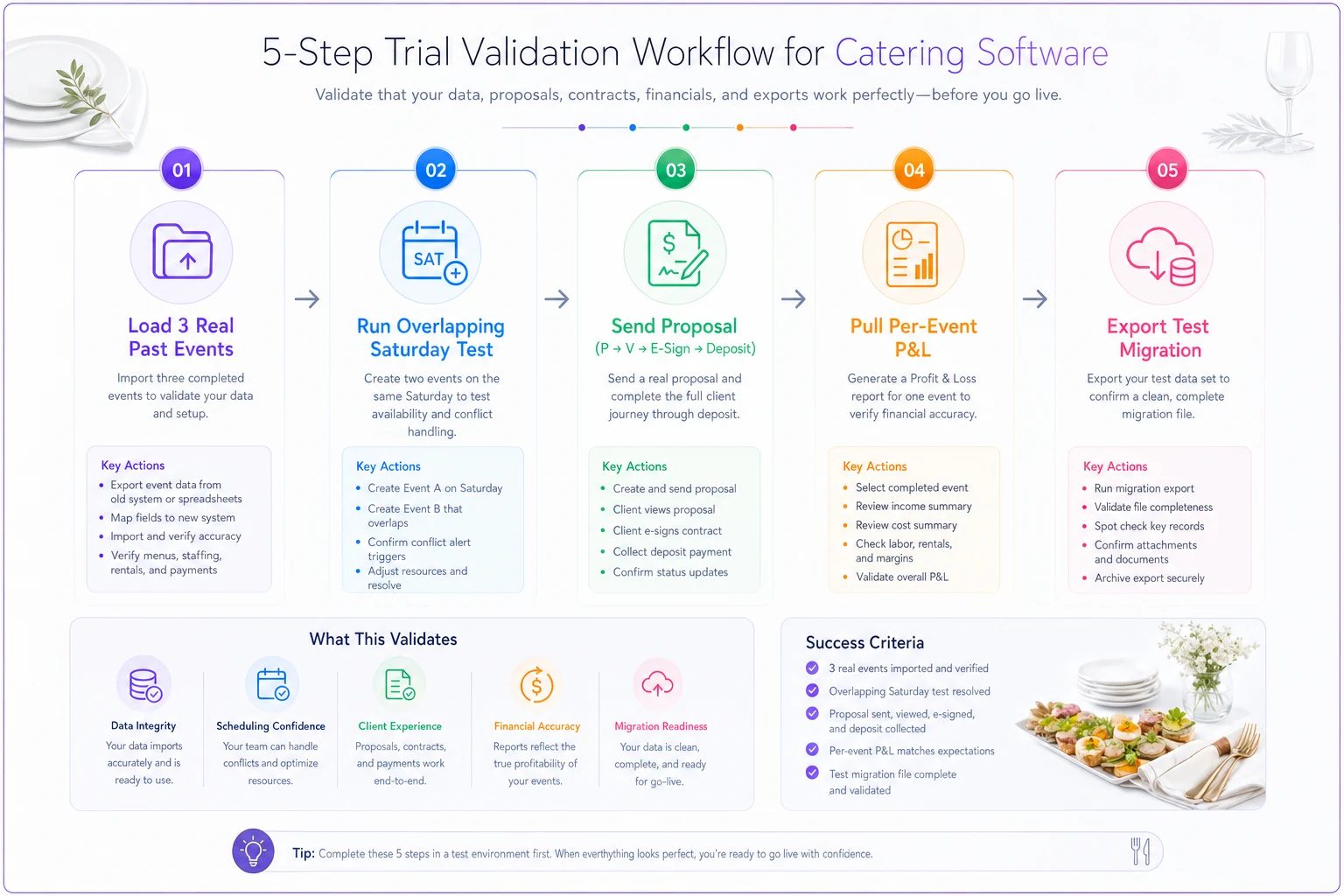
Use this to keep the trial focused on real operations rather than demo scripts.
If rebuilding past events is slower than an hour each, treat that as a red flag — it's going to be a daily painpoint.
A tool that survives all five of these is a real fit. Most that pass the demo fail step 2 or step 4.
Best-of-breed pairings vs. single-vendor
This is the decision most 10–20 person operators actually face, and it's worth being honest about both sides rather than defaulting to whichever answer sounds cleaner.
Single-vendor (e.g., Caterease or a CaterTrax-centered setup) makes sense when:
-
You want one login, one support line, one data model
-
Your operation has a clear dominant mode (either very event-detailed, or very recurring-corporate)
-
You'd rather accept "good enough" on costing or scheduling than manage integrations
Best-of-breed (e.g., CostGuard + 7shifts + HoneyBook) makes sense when:
-
No single platform is strong across costing, labor, and client comms at your size
-
You have specific acute pain — bleeding on food cost, or chaos in labor — that deserves a specialist tool
-
Someone in-house is comfortable owning the connections between systems
The honest tradeoff: best-of-breed usually gives you better capability per function but introduces the sync problem. Your event ID in HoneyBook has to match your labor data in 7shifts and your cost data in CostGuard, or you're back to manual matching at month-end. For most operators at this size, a sensible middle path is one platform as the system of record for the event — usually the client-comms or event tool — plus one specialist tool for whichever function hurts most, rather than three separate specialists from day one.
A shop where the owner is the only one touching software should probably not go best-of-breed at all. Three tools means three things to maintain, and without someone owning the glue between them, you'll get drift — records that don't match across systems. That drift costs more than the capability you gained.
A real scenario
A wedding-focused caterer with 15 full-time staff and around 35 on-call servers was running proposals through HoneyBook but costing menus in a spreadsheet and scheduling staff over text and a whiteboard. Their blind spot was labor. On a stretch of back-to-back June Saturdays they double-booked two captains across venues twice, and overtime quietly crept up because no one was watching the threshold across events — roughly an extra $2k–$3k in labor over the month that nobody budgeted for.
They added 7shifts alongside the HoneyBook setup they already had. Not a rip-and-replace, just the specialist tool for their actual pain point. Within two months the double-bookings stopped, and overtime dropped to something they could see and plan for ahead of time. They didn't buy an all-in-one suite. They bought the one piece that matched the one problem.
That's the pattern worth copying: diagnose the specific bleed first, then pick the tool whose fit signal matches it.
Migration checklist: don't lose your history
The most overlooked part of switching tools is preserving your past. Caterers who migrate badly lose the ability to answer "what did we charge this client last year?" or "what were our actual hours on events like this?" — which cripples your pricing and planning.
At minimum, preserve these fields and connectors when you move:
-
Event IDs — the spine of everything. If your old and new IDs don't map, your history is orphaned. Build a crosswalk table before you migrate.
-
Menu items with costs — not just names and prices, but the cost data behind them. Re-costing a full menu from scratch is weeks of work.
-
Staff hours by event — historical actuals are what let you estimate labor accurately next season. Export them tied to event IDs.
-
Invoices and payment records — deposits collected, balances, payment dates. Your accountant needs continuity here.
-
Client records — contacts, event history, and notes, linked to their past events.
Connectors to confirm before you commit:
-
Payroll export (so scheduled/actual hours flow out cleanly)
-
Accounting sync (QuickBooks/Xero for invoices and payments)
-
Payment processor continuity (so you don't lose stored client payment relationships)
Run a test migration with a small batch — ten events — before the full cut-over. Check that event IDs, menu costs, and hours landed correctly. If the test batch is clean, the full migration usually is too. If the test batch loses data, you just saved yourself from losing years of records.
Making the call
Don't start from the tool. Start from your worst recurring operational pain over the last three months. If it's deposits and proposals slipping, your answer is the client-comms layer. If it's overtime and double-bookings, it's scheduling. If it's the nagging feeling that certain menus lose money, it's costing. If it's recurring corporate orders you're managing by email, it's the ordering portal.
The fit signals above exist so you can match a specific pain to a specific tool without sitting through five sales demos. A 10–20 person shop doesn't need the biggest platform — it needs the one that fits the way your events actually run, plus the discipline to preserve your data when you move. Pick for your size and your bleed, validate it with the 30-day checklist, and migrate carefully. That's the whole game.
Ready to elevate your catering business?
Join 500+ caterers trusting Caterngly to save time, reduce errors, and deliver flawless events.