


Most buying mistakes for small catering shops don't happen during the demo. They happen weeks earlier, when the owner opens 14 browser tabs — each with a polished feature page — and tries to compare "event scheduling" across all of them. Everything looks similar. Everything claims to do costing. Everything has a "staff scheduling module." So the decision drifts, a sales rep gets pushy, and you end up on a platform built for a 60-person operation doing 200 events a quarter. Half the software sits unused and you're paying for seats you'll never fill.
The trick isn't evaluating more. It's evaluating less, faster, against the right fit signals. For a 10–20 person shop running weddings and corporate events, you don't need a feature matrix with 90 rows. You need to know, per vendor, the one thing that tells you whether this tool was actually built for a business your size. Then you need a demo that forces the vendor to prove it on your workflow, not their canned sample event.
This post gives you the shortlist logic, a single fit signal per vendor category, a prioritized demo checklist, the integration patterns that matter at your scale, a decision matrix you can copy, and a 30-day pilot plan that won't eat your busy season.
The real reason small caterers pick the wrong software
Small catering operators tend to buy on feature count when they should be buying on fit at their volume.
A platform designed for mid-market catering companies assumes you have an ops manager, a dedicated scheduler, maybe a part-time bookkeeper, and someone who "owns" the software day-to-day. At 10–20 people, you don't. The owner is often doing sales, menu costing, and staff texts from the same phone. A tool that requires three roles to function properly isn't a feature-rich upgrade — it's an unpaid second job.
The other pattern worth naming: evaluating costing and scheduling as if they're separate problems. At your size, the person building the proposal is usually the same person assigning the chef and emailing the client the final headcount. If those three things live in disconnected tools, you've just recreated the spreadsheet chaos you were trying to escape — except now you're paying a monthly subscription for it. So the question for every vendor isn't "can it do X." It's: does this reduce the number of places I have to type the same event detail?
The four capability buckets you're actually shortlisting against
Keep the scope tight. For weddings and corporate at your size, you're comparing tools on four jobs:
End chaos with centralized catering management.
Caterngly helps you plan, confirm, and manage every catering event seamlessly.
- Unified event and order management
- Real-time client updates
- Staff and resource scheduling
No credit card required
-
Event scheduling — the calendar and booking spine, including deposits, holds, and turnaround between back-to-back events.
-
Recipe / item-level costing — per-plate and per-component costs that roll up into a proposal and flag margin before you send it.
-
Staff assignments — who's working, what role, confirmed or not, with mobile visibility for the crew.
-
Client communications — proposals, approvals, final-count confirmations, and the paper trail when scope changes.
Any vendor missing two of these is off the list immediately. A vendor strong in three but weak in costing is still viable if it integrates cleanly with a costing tool you already trust. That's the whole game: strong core plus clean integration beats a mediocre all-in-one every time.
Six vendor categories and the one fit signal for each
I'm deliberately grouping by type rather than naming specific brands that'll be renamed or acquired by the time you read this. The categories map to real products you'll find when you search. The point is the fit signal — the single thing to check that tells you a tool actually suits a small shop.
| Vendor category | What it's best at | Fit signal for a 10–20 person shop | Watch-out |
|---|---|---|---|
| Catering-specific all-in-one | Proposals, BEOs, costing, scheduling in one place | Pricing tier includes unlimited events at the lowest seat count (not metered per-event) | Often priced for 25+ seat teams; core modules may assume a dedicated scheduler |
| Event-management + CRM platform | Lead pipeline, client portal, e-sign proposals | Has a native "lite" or starter tier under ~$150/mo with client portal included | Costing is often an add-on or weak; check it's item-level, not just line-item |
| Recipe-costing / menu-engineering tool | Deep ingredient-level costing, yield, substitution math | Integrates (API or CSV) with your proposal tool so costs flow out | Won't handle scheduling or client comms — must pair with something else |
| Staff scheduling / shift app | Crew assignments, availability, mobile confirmations | Free or cheap tier for under ~20 staff with text/push confirmations | Doesn't know about events — needs event data pushed in or re-entered |
| General business ops / workflow platform | Centralizing tasks, checklists, assignments across the team | Flexible enough to model your event workflow without heavy setup | Not catering-aware; you build the structure, which takes real upfront time |
| Accounting-anchored suite | Invoicing, payments, deposits, reconciliation | Already your books system and has a catering/booking add-on or integration | Event features usually shallow; fine as the money layer, not the ops layer |
The fit signal column is what most buyers skip. A vendor can have every feature on the list and still be wrong because its cheapest real plan starts at seat counts you'll never hit. Pricing tier is a fit signal, not a footnote. If the entry plan assumes 20+ users and you have 12, you're subsidizing someone else's workflow.
How to read the signals in combination
Most small operators land on one of two sensible configurations:
-
- One catering-specific all-in-one covering scheduling, costing, and comms, with a lightweight staff app layered on top for crew confirmations.
-
- An event-management/CRM platform for client-facing work (proposals, portal, e-sign) paired with a dedicated costing tool feeding it the numbers.
The all-in-one wins on fewer logins. The pairing wins when costing is the thing that keeps you up at night and no all-in-one does it well enough. Pick the shape first, then shortlist 4–6 products inside it. Don't shortlist across shapes — that's how you end up comparing apples to invoices.
The prioritized demo checklist
The demo is where vendors show you their event, perfectly configured. Flip it. Bring one real wedding and one real corporate event from your last quarter — actual numbers — and make them build it live. Here's the order to run it, prioritized because you'll run out of patience before you run out of questions.
Run these first (deal-breakers):
-
Build my actual event. Hand them a real BEO. Can they enter a 120-guest plated wedding with a passed-apps hour, two entrée choices, and a vendor meal count — in under 10 minutes, without a "we'll set that up for you later"?
-
Show the margin before I send. Enter real ingredient costs on two menu items. Does the proposal surface food cost percentage and event margin before the client sees a price?
-
Assign a crew and get confirmations. Assign a chef, two servers, and a captain. Can the crew confirm from a phone, and does the system show unconfirmed slots at a glance?
-
Change the headcount. Drop the wedding from 120 to 104 guests. Watch what updates automatically — costing, staffing, invoice — and what you'd have to fix by hand.
Run these second (friction and fit):
-
5. Back-to-back turnaround. Put two Saturday events on the calendar. Does it warn you about shared staff or equipment conflicts?
-
6. Client-facing proposal quality. Send yourself the proposal. Does it look like your brand, or like a software template?
-
7. Export the numbers. Can you pull a per-event cost breakdown and staffing list into a spreadsheet without opening a support ticket?
Run these last (nice-to-have, won't break the deal):
-
8. Reporting dashboards, templates library, and any AI features. Treat these as tiebreakers, not reasons to buy.
The single most revealing moment in any catering demo is step 4 — the headcount change. At your volume, final counts shift constantly in the last two weeks before an event. A tool that recalculates food cost, staffing need, and the invoice from one edit saves you exactly the manual rework that eats small-shop evenings. A tool that makes you touch three screens for one change is quietly telling you it was built for someone with staff to absorb that friction.
Integration patterns that actually matter at your scale
You don't need a dozen integrations. You need three connection points to hold, and you need to know which direction the data flows.
Staffing integration. If scheduling and crew assignments live in separate tools, the event has to push staff requirements out to the scheduling app, and confirmations have to come back. The failure mode is re-entering the crew list by hand every time an event changes — which, as already noted, is constantly. If your event tool and your staff app don't talk, budget for that re-entry time honestly. It's usually more than the price difference between integrated and non-integrated options.
Accounting integration. Deposits, payment schedules, and final invoices should flow to your books without double entry. The clean pattern: the event tool is the system of record for what was sold and delivered, and it syncs invoices and payments to accounting. The messy pattern: you invoice from the event tool and re-enter it in accounting, which guarantees reconciliation mismatches eventually. For the deeper mechanics of matching bookings to the money, the reconciliation discipline matters more than the specific connector.
Mobile apps for the crew. The people loading the van and setting up on site won't log into a web dashboard. They need a phone view showing their assignment, call time, address, and pack list — and a way to confirm. If the "mobile" experience is just the website shrunk down, the crew won't use it and you're back to the group text. Test the actual phone app during the demo, on your phone, not theirs.
Test the actual phone app during the demo, on your phone, not theirs.
One more pattern worth flagging for corporate work specifically: recurring and multi-site accounts behave differently than one-off weddings, and your tooling needs to handle standing orders and repeat clients cleanly. If corporate is a meaningful share of your book, the structure in the enterprise corporate-account operating playbook will tell you which account features to insist on during the demo.
A one-page decision matrix you can copy
Open a spreadsheet, list your 4–6 shortlisted vendors across the top, and score each row 1–5. Keep it to one page so you can actually make a decision in one sitting.
Rows to include:
-
- Fit signal present? (the single signal from the table above — yes/no, and this gates everything)
-
- Entry pricing matches our seat count (1–5)
-
- Built my real event in the demo without "later" (1–5)
-
- Shows margin before the proposal goes out (1–5)
-
- Crew confirms from a phone (1–5)
-
- Headcount change auto-updates costing + staffing + invoice (1–5)
-
- Clean accounting sync, no double entry (1–5)
-
- Export to spreadsheet without support (1–5)
-
- Total monthly cost at our actual usage (dollar figure, not a score)
-
- Support responsiveness during the trial (1–5)
How to weight it: the headcount-change row and the fit-signal row carry the most weight. A vendor that scores a 5 on reporting and a 2 on headcount recalculation is a bad fit for a small shop, full stop. Reporting is something you look at monthly. Headcount changes are something you deal with weekly. Weight toward the work you actually repeat.
Set a hard rule before you score: any vendor without the fit signal is disqualified regardless of total points. This kills the shiny-feature halo effect, where a great client portal distracts you from the fact that the plan starts at 25 seats.
A real scenario: swapping chaos for one source of truth
A two-owner catering operation — about 14 people counting part-time servers, running a roughly 60/40 split of weddings to corporate lunches — was managing everything across a shared calendar, a costing spreadsheet, a separate invoicing app, and a group text for the crew. Nothing was wrong with any single tool. The problem was the gaps between them.
Their recurring failure: final guest counts would change in the last ten days, and the updated number would make it into the kitchen prep sheet but not into the staffing assignment or the invoice. Over a busy season they figured this was costing them somewhere in the low thousands — a server too many here, an under-billed headcount there, plus a couple of hours every week spent cross-checking that all three systems agreed.
They shortlisted four tools using the shape-first approach: they chose the all-in-one shape because fewer logins mattered more to them than deep costing, and their menu was stable enough that the costing spreadsheet wasn't the actual bottleneck. They ran the demo checklist and disqualified two vendors on step 4 — neither one updated the invoice when the count changed. Of the remaining two, one had an entry plan built for 25 seats, so the fit signal knocked it out.
After a 30-day pilot on the survivor, the measurable change wasn't dramatic revenue growth. It was the quiet elimination of the cross-check. One edit to the guest count now flowed to prep, staffing, and the invoice. The weekly reconciliation time dropped to almost nothing, and the under-billing leak closed because the invoice couldn't fall out of sync with the count anymore. Unremarkable on paper, meaningful on a Saturday night.
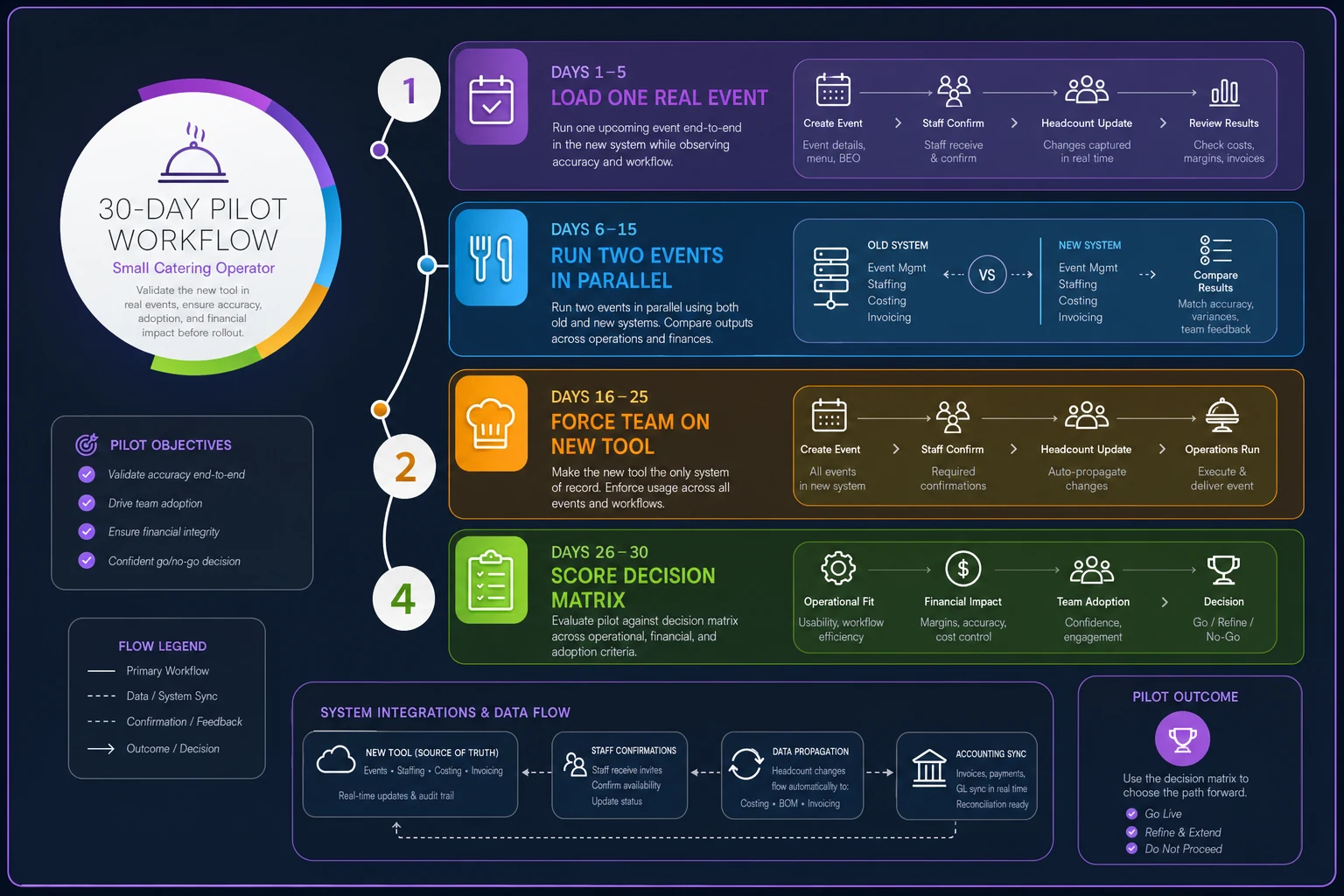
The 30-day pilot plan
Don't pilot during peak season. Pick a 30-day window with a normal mix of events — ideally one wedding and two corporate jobs you can run end-to-end.
-
1. Days 1–5
Load one real event, fully.
Not a sample — a live upcoming event. Build the proposal, cost it, assign the crew. If you hit a wall your sales rep didn't warn you about, that's your answer early. -
2. Days 6–15
Run two events live in parallel with your old system.
Yes, double work for two weeks. It's the only way to catch what breaks under real conditions without betting the business on it. -
3. Days 16–25
Stop using the old system for new events.
Force the team onto the new tool. Watch where people revert to texting or spreadsheets — those are the friction points the vendor glossed over in the demo. -
4. Days 26–30
Score the matrix for real.
Re-score every row based on what actually happened, not what the demo promised. Pull your actual monthly cost at real usage, including any seats or add-ons you discovered you needed.
Diagram of the 30-day pilot workflow:
When an all-in-one makes sense
If your menu is relatively stable, your costing doesn't need deep ingredient-yield math, and your biggest pain is juggling logins — a catering-specific all-in-one is almost always the right call at your size. Fewer seams, fewer places for the headcount to fall out of sync.
When the pairing approach makes sense
If per-plate margin is what keeps you up at night and no all-in-one costs your menu accurately enough, pair a serious costing tool with a client-facing event platform. You accept one more login in exchange for costing you actually trust.
Who should not switch right now
If you're running fewer than roughly a dozen events a quarter and your spreadsheet-plus-calendar setup isn't actively causing errors, hold off. Software has a setup cost in hours you don't get back, and below a certain event volume the manual approach is genuinely cheaper. Buy the tool when the cross-checking starts eating your evenings — not before.
Final thought
The best outcome from this process isn't the "winning" vendor. It's walking into every demo knowing the one signal that disqualifies a tool for a shop your size, and forcing each vendor to prove themselves on a real event you've actually run. Do that, and the shortlist collapses from fourteen browser tabs to two real contenders fast. Then let a disciplined 30-day pilot — not a polished sales deck — make the final call.
Ready to elevate your catering business?
Join 500+ caterers trusting Caterngly to save time, reduce errors, and deliver flawless events.