

Your booking system shows the Martinez wedding brought in $8,400. Your POS says $7,950. Payroll has staff logged for an event labeled "Saturday PM shift." The accounting system shows a deposit from three weeks ago that might be related, but the memo field just says "Event deposit - M."
This happens because catering operations run on parallel systems that speak different languages. A booking becomes an invoice, which becomes transactions, which become payroll entries, which become general ledger lines. Each translation loses critical context until you're left matching fragments across five different exports every Monday morning.
The real damage isn't just the time sink. When your systems can't trace a single event through its entire financial lifecycle, you miss critical patterns. That underperforming Saturday crew? They've worked a dozen events with noticeably higher labor costs, but you'd never spot it because payroll groups them under "weekend staff" while events track individual assignments. The frequent upsells from your signature dessert station? Invisible, because POS rings them as "miscellaneous additions" while bookings show the base package price.
Why catering data flows break at every handoff point
Most caterers piece together their tech stack over time. You start with a booking system because you need to track events. Add a POS when card processing fees get out of control. Implement payroll software when manual calculations eat up entire afternoons. Each system solves its immediate problem well enough.
But they create a new one: data fragmentation.
Your booking system assigns event ID #4521. Your POS creates transaction batch TB-0892. Payroll generates timesheet period TP-2024-42. Accounting posts to journal entry JE-10245. Four different identifiers for the same Saturday night corporate gala, and zero automatic connection between them.
The typical catering integrations playbook tries to solve this with basic syncs — push customer names from bookings to POS, send daily sales totals to accounting, export timesheets to payroll. These point-to-point connections move data but lose the relationships that matter for operational decisions.
What works better is canonical mapping: a master translation layer that preserves event context as data flows between systems. Instead of five disconnected records, you maintain one authoritative event profile that links to standardized fields in each platform.
Building your canonical event model
Start with the core entity everything else references — the event itself. This becomes your rosetta stone for connecting fragmented data across systems.
End chaos with centralized catering management.
Caterngly helps you plan, confirm, and manage every catering event seamlessly.
- Unified event and order management
- Real-time client updates
- Staff and resource scheduling
No credit card required
Primary Event Fields
| Source System | Field Name | Canonical Field | Data Type | Validation Rule |
|---|---|---|---|---|
| Booking | event_number | EVENT_ID | String(10) | Unique, non-null |
| Booking | client_name | CLIENT_NAME | String(100) | Non-null |
| Booking | event_date | EVENT_DATE | Date | Valid date, not past |
| Booking | venue_name | VENUE_CODE | String(20) | Maps to venue master |
| Booking | total_quoted | CONTRACT_AMOUNT | Decimal(10,2) | Greater than zero |
| Booking | guest_count | GUEST_COUNT | Integer | Between 10-500 |
| Booking | service_type | SERVICE_LEVEL | Enum | Full/Drop-off/Hybrid |
Start your canonical model with fields you already report on weekly so you get quick wins.
This canonical model becomes the spine every other system references. When POS processes a payment, it links to EVENTID. When payroll calculates hours, it tags EVENTID. When accounting posts revenue, it references EVENT_ID.
Raw field mapping only solves part of the problem though. The bigger challenge is handling the transformations and business logic that happen between systems.
ETL patterns that preserve event context
Your Saturday night event generates dozens of data points across multiple systems. The ETL (Extract, Transform, Load) process needs to maintain relationships while handling the messy reality of operational data.
Stage 1: Extraction with event tagging
POS extraction logic:
-
Match transaction date/time to event schedule (EVENT_DATE + 4 hour window)
-
Cross-reference customer name to CLIENT_NAME
-
If venue-based POS, use terminal location to confirm VENUE_CODE
-
Tag all matching transactions with EVENT_ID
-
Flag unmatched transactions for manual review
Payroll extraction logic:
-
Pull timesheets for EVENT_DATE
-
Match staff assignments from booking system
-
For unscheduled clock-ins, check proximity to VENUE_CODE
-
Group all hours under EVENT_ID
-
Calculate variance from scheduled vs actual hours
Stage 2: Transformation rules
IF POS.paymenttype = "Corporate Check" AND EVENT.servicelevel = "Full Service" THEN paymentterms = "NET30" IF PAYROLL.overtimehours > 0 AND EVENT.endtime < "10:00 PM" THEN flagforreview = "Unexpected overtime" IF POS.totalsales > (EVENT.contractamount * 1.15) THEN upsellflag = TRUE AND upsellamount = POS.totalsales - EVENT.contract_amount
These transformation rules turn disconnected data points into operational intelligence. You're not just moving numbers between systems — you're building a complete picture of each event's performance.
Stage 3: Loading with reconciliation checks
Before data lands in target systems, run validation checks that catch mismatches:
Financial reconciliation:
-
CONTRACT_AMOUNT should equal sum of POS transactions ± 5%
-
Deposit received should match booking system deposit amount
-
Tax collected should align with venue jurisdiction rates
-
Tips should fall within 15-22% for full-service events
Operational reconciliation:
-
Staff hours shouldn't exceed EVENT_DURATION + 3 hours setup/breakdown
-
Inventory consumed should match GUEST_COUNT ratios
-
Rental returns should match rental pickups from same EVENT_ID
Here's a visual of the ETL workflow.
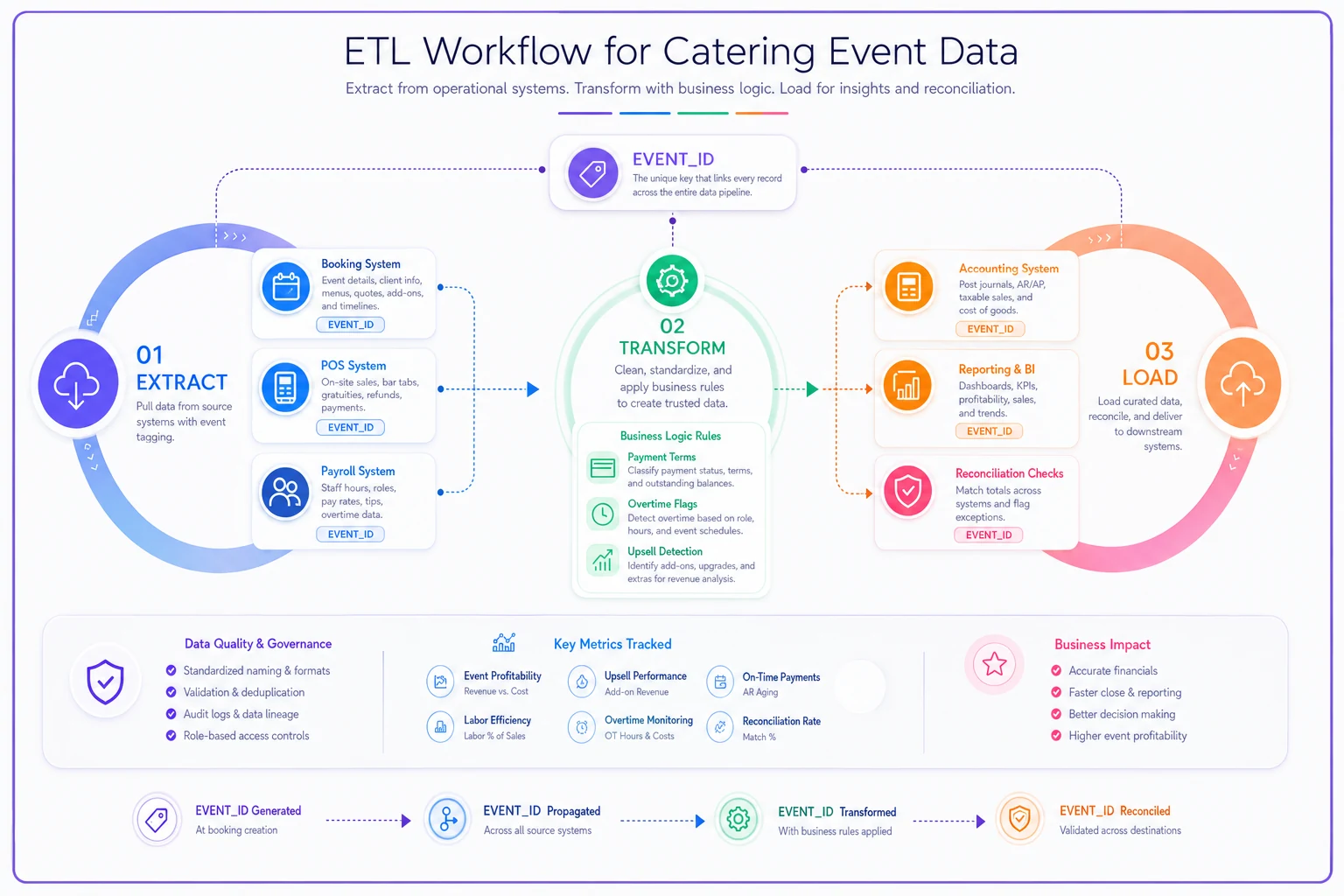
When reconciliation fails, the system quarantines the data for review instead of corrupting downstream systems with bad information.
Sample field mappings for common integrations
Different catering software combinations require specific field mappings. Here's what tends to work for typical stacks:
Booking to POS mapping
| Booking System Field | Transform Logic | POS Field | Notes |
|---|---|---|---|
| event_number | Direct map | order_reference | Some POS limit to 8 chars |
| client_company | Concatenate with last_name | customer_name | POS often has single name field |
| service_datetime | Split into date + time | transactiondate, servicetime | Handle timezone conversions |
| menu_items[] | Flatten to line items | product_codes[] | Map menu names to POS SKUs |
| service_charge | Calculate percentage | autogratuitypercent | Some POS need percentage not dollar |
| taxexemptid | Conditional logic | taxoverrideflag | Set flag if ID exists |
POS to Payroll mapping
| POS Field | Transform Logic | Payroll Field | Notes |
|---|---|---|---|
| server_id | Lookup employee number | employee_id | Handle terminated employees |
| shift_start | Round to 15-min increment | clockintime | Match payroll rounding rules |
| tips_collected | Aggregate by employee | tip_amount | Include credit + cash |
| transaction_location | Map to cost center | department_code | For venue-based allocation |
| breaktimetotal | Convert minutes to decimal | break_hours | Payroll uses decimal hours |
Payroll to Accounting mapping
| Payroll Field | Transform Logic | GL Account | Notes |
|---|---|---|---|
| regular_hours * rate | Sum by event | 5010 - Direct Labor | Tag with EVENT_ID |
| overtime_hours * rate | Sum by event | 5011 - OT Labor | Flag if > 10% of regular |
| employertaxtotal | Allocate by hours ratio | 5020 - Payroll Tax | Distribute across events |
| tips_paid | Match to POS tips | 2010 - Tips Payable | Should net to zero |
| mileage_reimbursement | Tag to event | 5030 - Travel Expense | Track by EVENT_ID |
Different catering software combinations require specific field mappings. Here's what tends to work for typical stacks:
Test cases that catch integration failures
Running structured test cases reveals gaps before they hit production. Focus on scenarios that mirror real operational chaos:
Test Case 1: Split payment reconciliation
Scenario: Corporate client pays 50% deposit via ACH, 50% credit card day-of Systems involved: Booking, POS, Accounting Expected result: Both payments link to same EVENT_ID, total matches contract Common failure: POS payment doesn't match booking due to service charge added day-of Fix: Include service charge field in canonical model, update transform logic
Test Case 2: Staff schedule changes
Scenario: Scheduled server calls out, replacement clocks in without assignment Systems involved: Booking, Payroll Expected result: Replacement hours still tag to correct EVENTID Common failure: Unassigned hours go to "general" category Fix: Add proximity matching logic — unassigned clock-ins within 30 minutes and 1 mile of event venue auto-tag to EVENTID
Test Case 3: Multi-day event handling
Scenario: Three-day conference with different menus each day Systems involved: All systems Expected result: Each day maintains separate sub-EVENTID while rolling to master event Common failure: Systems treat as three unrelated events Fix: Create parent-child EVENTID structure (4521-1, 4521-2, 4521-3)
Test Case 4: Venue commission calculations
Scenario: Country club takes 20% of bar sales, 10% of food Systems involved: POS, Accounting Expected result: Commissions auto-calculate and post to correct GL accounts Common failure: All sales treated equally, commission miscalculated Fix: Add item category mapping, separate commission rules by category
The Monday morning reconciliation workflow
Even with solid integrations, you still need a systematic review process. Here's the workflow that catches issues before they compound:
8:00 AM - Automated overnight reports run
-
System generates exception report for all weekend events
-
Flags any EVENT_ID with >5% variance between systems
-
Highlights missing data (events with no POS data, shifts with no event tags)
8:30 AM - Review exception report
Start with highest-revenue events first. Check:
-
Did all POS transactions map to correct events?
-
Are labor hours within expected range?
-
Did deposits post to accounting?
-
Any rental equipment still showing as unreturned?
9:00 AM - Fix data mismatches
-
Identify which system has correct data (usually bookings for event details, POS for actuals)
-
Update canonical mapping if the pattern will repeat
-
Manually adjust downstream systems if it's a one-time issue
-
Document root cause for pattern analysis
9:30 AM - Push corrections to systems
-
Update payroll before timesheet approval deadline
-
Adjust accounting entries before daily close
-
Sync corrected data to reporting dashboard
10:00 AM - Verify corrections
-
Re-run reconciliation report
-
Confirm all variances resolved or documented
-
Update per-event profit tracking with accurate data
With proper integration mapping, this Monday morning routine typically takes around two hours versus six hours of manual Excel matching. The difference compounds when you're running multiple weekend events across different venues.
Moving from Excel matching to automated reconciliation
Most caterers start with Excel exports from each system, using VLOOKUP to match records. This works fine at 10 events per month. At 30+, the manual process breaks down pretty quickly.
The intermediate step usually involves partial automation — Power Query templates that standardize exports, or Zapier pushing some data between systems. These reduce manual work but don't solve the core problem: your systems still don't share a common language.
Full automation requires that canonical model described earlier. Once EVENT_ID flows through every system, reconciliation becomes a straightforward database query instead of detective work. Mismatches trigger alerts instead of hiding in spreadsheets. Labor cost overruns link directly to specific events instead of showing up as mysterious payroll variances weeks later.
The implementation doesn't have to be all-or-nothing either. Start with your biggest pain point — usually POS to accounting reconciliation. Build canonical mapping for just those two systems, get that flow working cleanly, then add payroll, then inventory, then rentals. Each addition becomes easier because you've already established the common language.
Modern operational platforms handle this translation layer automatically. Instead of building custom integrations between five different systems, you connect each system once to the platform, which maintains the canonical model, runs the ETL processes, and enforces validation rules. When POS data arrives, it automatically maps to the right event, transforms based on your business rules, and flows to accounting with full context preserved.
This approach eliminates the traditional post-event reconciliation scramble because reconciliation happens continuously. By Monday morning, you're reviewing exceptions — not rebuilding the entire picture from fragments.
When integration automation actually makes sense
Not every catering operation needs full integration automation. If you're running 10 events per month with consistent crews and a simple service model, manual reconciliation might only take a few hours weekly. The complexity of setting up integrations might genuinely outweigh the benefits.
The tipping point usually arrives around 25-30 events monthly, or earlier if you have:
-
Multiple service models (full-service, drop-off, staffed buffets)
-
Venue partnerships with different commission structures
-
Mixed payment terms (corporate NET terms, consumer prepay, day-of collection)
-
Staff working across multiple events in a single day
-
Rental equipment moving between venues
The real indicator isn't event volume — it's reconciliation complexity. When your Monday morning review involves three spreadsheets, two calculator apps, and a notepad full of manual calculations, you've already crossed the point where automation pays for itself.
Protecting against integration brittleness
The biggest risk with automated integrations isn't technical failure — it's business logic drift. Your integration might perfectly map fields between systems today, but what happens when you add a new service type? Change your commission structure? Start operating in a new tax jurisdiction?
Use lookup tables, not hard-coded logic
Instead of: IF venue = "Grand Ballroom" THEN commission = 0.15
Build: Venue master table with commission rates, referenced by VENUE_CODE
Version your transformation rules
Track when business logic changes and why. When you update overtime calculations for new labor laws, document the change date and regulation reference. This prevents mysterious discrepancies months later.
Maintain manual override capability
Sometimes the automated logic gets it wrong. Maybe a client pays partially in gift cards, or a venue waives their commission for a charity event. Build override fields that let you manually adjust while preserving the audit trail.
Test edge cases monthly
-
Negative quantities (returns, refunds)
-
Zero-dollar transactions (comps, samples)
-
Split-venue events (ceremony at one location, reception at another)
-
Partial cancellations (reduced guest count day-of)
These edge cases reveal where your canonical model needs expansion.
Beyond basic reconciliation
Once your catering integrations playbook handles the basics — matching bookings to POS to payroll — you can start building operational intelligence on top of that foundation. The canonical EVENT_ID that links all your systems becomes the key to deeper insights.
Track staff performance across events by combining POS tip data with payroll hours and customer feedback. Identify which menu items drive the highest margins by connecting booking packages to actual POS item sales and inventory consumption. Spot venues where labor consistently runs over by comparing scheduled to actual hours by location.
These insights only emerge when your data speaks a common language. The same canonical model that cleans up Monday morning reconciliation also enables the kind of pattern recognition that actually moves the needle on profitability.
The goal isn't perfect integration — it's operational visibility. When every dollar, hour, and item traces back to a specific event, you can finally see which events make money, which don't, and why. That visibility turns catering from a game of educated guesses into something you can actually manage and improve systematically.
Manual reconciliation will always have a place for edge cases and exceptions. But for the bulk of standard events that follow predictable patterns, automated integration through canonical mapping eliminates hours of weekly detective work while giving you the real-time visibility needed to protect margins in an industry where every percentage point counts.
Manual reconciliation will always have a place for edge cases and exceptions. But for the bulk of standard events that follow predictable patterns, automated integration through canonical mapping eliminates hours of weekly detective work while giving you the real-time visibility needed to protect margins in an industry where every percentage point counts.
The goal isn't perfect integration — it's operational visibility. When every dollar, hour, and item traces back to a specific event, you can finally see which events make money, which don't, and why.
Ready to elevate your catering business?
Join 500+ caterers trusting Caterngly to save time, reduce errors, and deliver flawless events.